- 対応バージョン:不明
- サブスクライバー数:5406
- 最終更新:2026-04-06 18:40:53 UTC
- 制作者:76561198014968620
MOD説明(日本語)
MOD概要
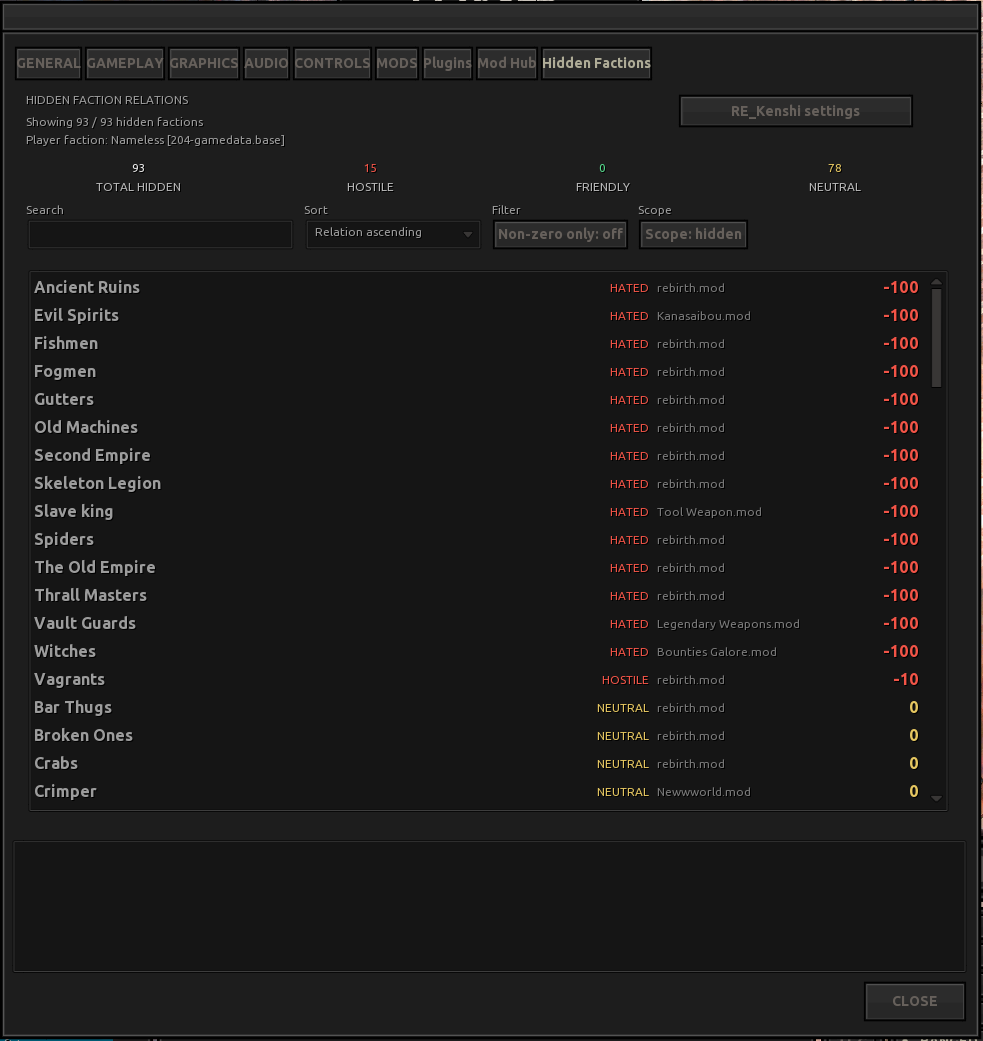
Kenshiのオプションメニューに「Hidden Factions」タブを追加し、プレイヤーの隠された派閥関係値をゲーム内で表示するMODです。このMODの導入には、前提MODであるRE_Kenshiが必須です。ゲームのバランス、ステータス、経済、コンテンツには一切変更を加えません。
このMODで何が変わるか
– Kenshiのオプションウィンドウに「Hidden Factions」タブが追加されます。
– 追加されたタブ内で、プレイヤーと各派閥の関係値が一覧表示されます。
– 派閥リストには以下の機能が提供されます:
– 派閥名でフィルタリングするための検索バー(Ctrl+Left/Right, Ctrl+Deleteのワードジャンプショートカット対応)。
– 関係値またはアルファベット順でのソート機能。
– 全派閥を表示するか、隠し派閥のみを表示するかを切り替えるトグル。
– 関係値がゼロでない派閥のみをフィルタリングするトグル。
– 関係値が色分け表示されます(敵対/友好的/中立)。
– オプションで設定可能なキーボードショートカット(デフォルト: Alt+Ctrl+G)を使用して、このパネルを直接開くことができます。
– `Emkejs Mod Core`がインストールされている場合、`Emkejs Mod Hub`を通じて設定を変更することができます。
想定されるメリット(推定)
– プレイヤーはゲーム内で隠された派閥関係値を容易に確認できるようになるため、派閥との友好度や敵対度を詳細に把握しやすくなると考えられます。
– 派閥関係の可視化により、同盟や敵対などの戦略的な意思決定が、より計画的に行えるようになると考えられます。
– 検索、ソート、フィルタリング機能が充実しているため、特定の派閥に関する情報を素早く効率的に見つけ出すことができると考えられます。
– 関係値が色分け表示されることで、現在の派閥との関係性を視覚的に素早く認識し、状況判断を助けると考えられます。
– ゲームバランスには一切影響を与えないため、バニラのゲームプレイ体験を損なうことなく、情報面での利便性だけを向上させられると考えられます。
想定されるデメリット・注意点(推定)
– `RE_Kenshi`が必須MODであるため、導入にはその前提条件を満たす必要があります。`RE_Kenshi`自体の安定性や互換性にも依存する可能性があります。
– Mod Hubによる設定変更は任意であり、`Emkejs Mod Core`が導入されていない場合は、設定ファイル(`mod-config.json`)を手動で編集する必要があるかもしれません。
– ゲーム画面に新たなUI要素が追加されるため、一部のプレイヤーはゲームの没入感がわずかに損なわれると感じる可能性があります。
– バージョンが”0.1.0-alpha.1″と記載されているため、まだ初期開発段階であり、予期せぬバグや将来的な機能変更・追加の可能性が考えられます。
向いている人(推定)
– Kenshiのゲームシステムや派閥関係を深く理解し、それに基づいて戦略を立てたいプレイヤー。
– ゲーム内の詳細な数値を把握することで、より計画的なロールプレイングや派閥交渉を楽しみたいプレイヤー。
– 派閥との友好度や敵対度がゲームプレイにどう影響するかを明確に把握したいプレイヤー。
– UIの利便性を向上させるMODを好むプレイヤー。
– バニラのゲームバランスを維持しつつ、情報アクセスを改善したいプレイヤー。
向いていない人(推定)
– 派閥関係のような隠し要素を「ゲームプレイを通じて発見するもの」として楽しみたい、情報が露骨に表示されることを好まないプレイヤー。
– UIの追加や変更を一切望まず、純粋なバニラUI体験を重視するプレイヤー。
– 必須MODの導入作業に抵抗がある、あるいは既存のMOD構成を複雑にしたくないプレイヤー。
総合評価(暫定)
– おすすめ度:★★★★☆
– 根拠:Kenshiの派閥関係はゲームプレイの進行に非常に重要ですが、バニラ環境ではその詳細な数値を確認することが困難です。このMODはゲームバランスに影響を与えることなく、その重要な情報をゲーム内で明確に表示し、さらに検索・ソート・フィルタリング機能で利便性を高めます。これにより、プレイヤーの戦略立案や状況判断を大幅に支援するため、非常に有用なツールと考えられます。必須MODが存在する点やアルファ版であるという点は考慮が必要ですが、機能の有用性は高く評価できます。
※この説明文はAIによる自動翻訳です。正確な情報は下記の原文またはSteam Workshop公式ページをご確認ください。
原文を見る(英語)
Open Kenshi’s Options window and switch to the Hidden Factions tab.
Search bar with word-jump shortcuts (Ctrl+Left/Right, Ctrl+Delete).
Sort by relation value or alphabetically.
Toggle between showing all factions or hidden-only.
Filter to non-zero relations only.
Color-coded relation values (hostile/friendly/neutral).
No balance, stats, economy, or content changes.
Requirements
How to Use
Open Kenshi’s Options window and switch to the Hidden Factions tab.
The list shows all factions and your relation to each one.
Use the search bar to filter by faction name.
Use the sort dropdown to order by relation value or alphabetically.
Toggle Scope to show all factions or hidden-only.
Toggle Non-zero only to filter out zero-relation factions.
Optionally, use a keyboard shortcut to open directly to the panel (configurable in mod-config.json, default: Alt+Ctrl+G).
If Emkejs Mod Core is installed, you can change settings through Emkejs Mod Hub.
Optional Mod Hub
If Emkejs-Mod-Core is installed, this mod also registers its core settings in Mod Hub and still persists changes back to `mod-config.json`.
Recommended load order:
Emkejs-Mod-Core
this mod
Version: 0.1.0-alpha.1
My other mods
Wall-B-Gone – Adds a hotkey that allows the player to quickly dismantle player-built walls, furniture
Job-B-Gone – Adds a collapsible in-game panel above the squad UI that lets you quickly remove queued jobs for one member, selected members, a whole squad, or all player squads
Auto-Pause on Load – Auto-Pause on Load automatically pauses Kenshi after a save finishes loading, giving you time to review your squad and situation before the game resumes
Loot-Scoot-Execute – Adds an Execute action for downed enemies in the right-click context flow
Vital Sense – Highlights downed characters with state text/icons and shows configurable bounty symbol markers for downed and live bounty targets while ALT is held.
Organize the Trader – Adds a search bar to Kenshi trader windows so you can find items faster.
Map markers -Adds persistent custom markers to Kenshi’s world map through RE_Kenshi. You can place markers per save, assign a type, add a short label, and manage them directly on the map.
Emkejs Mod Core – Install this to enable the in-game menu and shared settings for this mod
Organize the Crafting Stations – Adds a search bar to Kenshi crafting and research windows so you can filter visible recipes and blueprints without scrolling through the full list.
Vital Read – Adds small configurable status markers to squad portraits so you can read critical downed and injury states at a glance without opening each character panel.
Emkejs Test Kit – Adds an in-game debug toolkit for Kenshi that brings Health, Stats, Teleport, Inventory, and Spawn tools together in a single panel, with spawn faction testing.
Organize the Inventory – Adds search bars to Kenshi’s inventory UI so you can filter the active player inventory view or supported creature and pack-animal inventory views without moving items.
Support / full patch notes
For updates, full changelog, bug reports, and support, use the Nexus page:
Hidden Faction Relations on Nexus Mods
Support the developer
If you enjoy my mods and want to support future development, you can support me on Ko-fi. You can also help decide what I build next by voting in my polls:
https://ko-fi.com/emkej
Credits
Lo-Fi Games (Kenshi)
RE_Kenshi team
To Bleeks360 for the idea
このMODはSteam Workshopで公開されています。ダウンロード・詳細は公式ページをご確認ください。