- 対応バージョン:1.2.1
- サブスクライバー数:6366
- 最終更新:2026-04-13 21:00:06 UTC
- 制作者:76561198022057780
MOD説明(日本語)
MOD概要
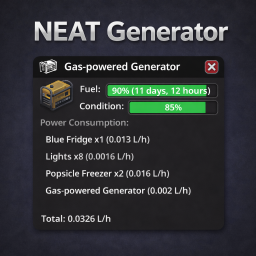
Neat Generatorは、Project Zomboid Build 42専用のMODです。発電機の情報ウィンドウを完全に再設計し、クリーンで視覚的に分かりやすいインターフェースを提供します。燃料と状態のカラーコード化されたプログレスバー、推定稼働時間の表示、詳細な電力消費リスト、電力範囲の視覚化オーバーレイなどが主な機能です。このMODを使用するには、NeatUI Frameworkが必須で、MODロードオーダーでNeat Generatorよりも前に配置する必要があります。
このMODで何が変わるか
– **発電機情報パネルの視覚的改善:**
– 発電機の情報パネルがNeatUIテーマに沿って完全に再設計されます。
– 燃料と状態のプログレスバーがカラーコード化され(緑: 50%以上、オレンジ: 20%以上、赤: 20%未満)、各バー内にパーセンテージ値が表示されます。
– 燃料バー内に推定稼働時間(日数/時間形式)が直接表示され、マウスオーバーすると燃料のパーセンテージ、リットル、残り時間がツールチップで表示されます。
– **電力管理機能の追加:**
– 稼働中の全デバイスと合計消費電力を示す詳細な電力消費リストが追加されます。
– 発電機が屋内に設置されている場合に、赤色の「Toxicity warning(毒性警告)」が表示されます。
– フォーカス中の発電機の電力供給範囲をハイライトする「Power range overlay」が追加されます。
– 全ての稼働中の発電機の結合された電力供給範囲をハイライトする「Union range overlay」が追加されます。
– これらの電力範囲オーバーレイはModオプションで色をカスタマイズ可能です。
– **操作性の改善:**
– 発電機情報パネルのヘッダーに電源ボタンが追加され、パネルから直接発電機のオン/オフを切り替えられます。
– 電源ボタンをクリックすると、キャラクターが発電機まで自動で移動してから操作を実行します。
– **Modオプションの追加:**
– NeatUIパネルとバニラウィンドウを切り替えるオプションがあります。
– パネルの背景透過度を調整するスライダーがあります。
– 推定稼働時間をサンドボックスの日長に合わせてリアルタイム時間に変換するオプション(デフォルトはオフ)があります。
– 発電機範囲および全発電機範囲の表示/非表示、色のカスタマイズが可能です。
– **その他:**
– ウィンドウ幅が電力消費リスト内の長いデバイス名に合わせて自動調整されます。
– Modが無効な場合でも、バニラのUIに復元されます。
– シングルプレイヤー(SP)でテスト済みですが、マルチプレイヤー(MP)ではテストされていません。
– ゲームパッドサポートは現時点では計画されておらず、主にマウス/キーボードでのプレイ向けに設計されています。
想定されるメリット(推定)
– **視認性の向上:** 発電機の燃料や状態、稼働時間が一目で分かりやすくなるため、発電機管理の負担が軽減されると考えられます。カラーコード表示により、緊急性の判断が容易になります。
– **拠点建設の効率化:** 電力範囲の視覚化オーバーレイにより、発電機の配置場所やカバー範囲を計画的に決定しやすくなり、無駄のない拠点構築に役立つと考えられます。
– **電力消費の最適化:** 詳細な電力消費リストを確認することで、どの設備がどれだけの電力を消費しているかを把握し、電力使用の最適化や燃料節約につながる可能性があります。
– **安全性向上:** 屋内設置時の毒性警告により、発電機による中毒リスクを早期に認識し、対策を講じやすくなると考えられます。
– **操作の簡略化:** 情報パネルからの直接的な発電機操作や自動移動機能により、発電機のオン/オフ切り替えがよりスムーズに行えると考えられます。
– **UIのカスタマイズ性:** パネルの透過度やオーバーレイの色を調整できるため、プレイヤーの好みに合わせたUIに設定できると考えられます。
想定されるデメリット・注意点(推定)
– **必須依存MOD:** NeatUI Frameworkの導入が必須であり、このMOD単体では機能しないため、導入の手間が増える可能性があります。また、ロードオーダーを正しく設定する必要があります。
– **ゲームバージョン制限:** Project Zomboid Build 42専用であるため、それ以前のビルドでは動作しません。ゲームのバージョンを確認しないとエラーやクラッシュが発生する可能性があります。
– **マルチプレイヤー環境での動作保証なし:** マルチプレイヤー(MP)環境でのテストは行われていないため、予期せぬ不具合やサーバーとの同期問題が発生する可能性があります。MPで利用する場合は自己責任となる可能性があります。
– **互換性の問題:** 発電機の情報パネルを改変する他のMODと競合し、正しく動作しなかったり、エラーを引き起こしたりする可能性があります。
– **ゲームパッド非対応:** ゲームパッドでの操作は想定されておらず、機能が制限されたり、操作が困難になったりする可能性があります。主にマウスとキーボードでのプレイに適していると考えられます。
– **情報過多の可能性:** 高度な情報や機能が追加されるため、シンプルなUIを好むプレイヤーにとっては、情報量が多く感じられる可能性があります。
向いている人(推定)
– Project Zomboid Build 42をプレイしている人。
– 発電機の管理をより効率的かつ視覚的に行いたいと考えている人。
– 拠点の設計や電力供給計画を綿密に行いたいサバイバー。
– NeatUI Frameworkを既に導入している、または導入に抵抗がない人。
– マウスとキーボードでProject Zomboidをプレイしている人。
– ゲーム内の情報を詳細に把握し、戦略に活かしたいプレイヤー。
向いていない人(推定)
– Project Zomboid Build 41以前のバージョンをプレイしている人。
– 発電機管理にそこまでこだわりがなく、シンプルなUIを好む人。
– 他の発電機情報UIを改善するMODを既に利用しており、競合を避けたい人。
– MOD導入の手間を最小限に抑えたい人(依存MODがあるため)。
– ゲームパッドのみでProject Zomboidをプレイしている人。
– マルチプレイヤー環境での完璧な安定性を最優先する人(MP未テストのため)。
総合評価(暫定)
– おすすめ度:★★★★☆
– 根拠:サブスクライバー数は不明。機能ベースでは、発電機管理に関する多数のQoL改善と視覚的な補助が提供されており、特に電力範囲のオーバーレイは拠点構築において非常に有用です。依存MODの存在やMP未テストといった注意点はあるものの、Build 42のシングルプレイヤー環境で発電機を多用するプレイヤーにとっては、ゲーム体験を大幅に向上させる価値の高いMODであると判断できます。
※この説明文はAIによる自動翻訳です。正確な情報は下記の原文またはSteam Workshop公式ページをご確認ください。
原文を見る(英語)
(Build 42 only, SP tested / MP not tested)
Tired of the vanilla Generator info window? Neat Generator gives your generator a clean, consistent look with colour-coded fuel and condition bars, estimated run time displayed directly in the bar, a detailed power consumption list, power range overlays to visualise coverage at a glance, and a modern interface that stays out of your way.
Dependency: NeatUI Framework must be enabled and placed before Neat Generator in your mod load order.
[hr]
Build 42 only
If the mod does not appear in your mod list, you are probably running Build 41.
This mod requires Build 42.
[hr]
Release V1.2.1
Fixed power range overlay now shows in red when the generator is off
Fixed empty line removed above Total in the power consumption list
Added power button added to the header: toggle the generator on/off directly from the info panel. Clicking the button auto-walks the character to the generator before acting
[hr]
Release V1.2.0
Power range overlay: highlights the zone powered by the focused generator
Union range overlay: highlights the combined zone of all active generators
Both overlays are colour-customisable in Mod Options (with separate colour pickers)
Union boundary is masked where it overlaps the per-generator zone
[hr]
Release V1.1.0
Estimated run time displayed inside the fuel bar (days / hours format)
Hover tooltip on the fuel bar showing fuel %, liters and hours remaining
New Mod Option: Convert to Real Time: adjusts run time to real-time hours based on day length
Window width now adapts automatically to long device names in the power list
[hr]
Release V1.0.0
Initial release for Build 42.16 (SP tested / MP not tested)
Generator info panel fully redesigned with NeatUI theme
Colour-coded fuel progress bar (green above 50%, orange above 20%, red below 20%)
Colour-coded condition progress bar (green / orange / red)
Percentage value displayed inside each bar
Power consumption list with all powered devices and total consumption
Toxicity warning shown in red when the generator is placed indoors
Toggle on/off in Mod Options (vanilla UI is restored when disabled)
Background opacity slider in Mod Options
[hr]
Mod Options
All options are available under Options -> Mod Options -> Neat Generator:
Use Neat Generator UI: Switch between the NeatUI panel and the vanilla window at any time without disabling the mod
Window background opacity: Control the transparency of the panel background
Convert to Real Time: Show the estimated run time in real-time hours adjusted for the sandbox day length (off by default)
Show generator range: Highlight the power zone of the focused generator (colour-customisable)
Show all generators range: Highlight the combined power zone of all active generators (colour-customisable)
[hr]
Check your generator
Right-click any generator in the world and select the info option. The panel opens with all relevant information clearly displayed.
Fuel level bar with colour feedback and percentage inside the bar
Condition bar with colour feedback and percentage inside the bar
Full list of powered devices with individual and total power consumption
Red toxicity warning when the generator is running indoors
[hr]
Gamepad Support
Gamepad support is not planned in the short term.
This mod is mainly designed for mouse / keyboard play.
[hr]
Mod Compatibility
Mods that replace the Generator info panel may conflict with Neat Generator.
Load Order Notes
Place NeatUI Framework before Neat Generator.
[hr]
Credits
Mod by ArtNod
Feature inspired by Better Generator Info by Eurymachus.
Visually inspired by Neat Crafting and Neat Building by Rocco and Afyrmo.
UI components provided by NeatUI Framework by Rocco.
Many thanks to Rocco and Afyrmo for their open framework and design work.
About permission
You are free to extract and use any content from this mod without asking for permission.
If you want to republish this mod, you need to follow these rules:
1. There must be substantial and important improvements.
2. If this mod has not been updated for a long time and has caused many issues, you may modify and republish it.
Workshop ID: 3702056978
Mod ID: Neat_Generator
このMODはSteam Workshopで公開されています。ダウンロード・詳細は公式ページをご確認ください。