- 対応バージョン:0.8.0
- サブスクライバー数:4457
- 最終更新:2026-10-16 18:03:53 UTC
- 制作者:76561197993535399
MOD説明(日本語)
MOD概要
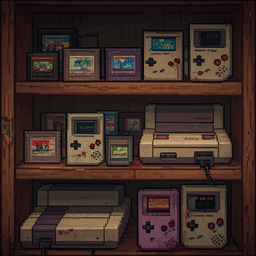
Project Zomboidの世界に、レトロゲーム機とゲームカートリッジを追加し、インゲームのテレビやハンドヘルド機で実際にゲームをプレイできるようにするMODです。必須MODとしてPZFB (Video Framebuffer)を導入することで、libretroエミュレーションコアを介してゲームが動作します。NES、SNES、Sega Genesis、Game Boy、Atari 2600、Game Gear、Master Systemの7種類のゲーム機と、224種類のゲームに対応しています。
このMODで何が変わるか
– **レトロゲーム機とカートリッジの追加**: 7種類のレトロゲーム機と224種類のゲームカートリッジが、ルートアイテムとしてゲーム内に出現するようになります。
– **リアルなルート分布**: ゲーム機やカートリッジは、1993年のケンタッキー州を想定した、富裕度に基づいたリアルな確率と場所で発見されます(例:SNESは裕福な家、Atariはガレージ、Game Boyは学校のロッカーなど)。
– **ゲームのプレイ機能**:
* テレビ、ゲーム機本体、またはカートリッジを右クリックすることでゲームをプレイできます。
* ハンドヘルド機(Game Boy、Game Gear)はテレビなしでどこでもプレイ可能ですが、プレイ中にバッテリーを消費し、バッテリーが切れると交換が必要です。
* テレビが電源に繋がっていない、カートリッジが近くにない、バッテリー切れなどの理由でプレイできない場合は、メニューオプションがグレーアウトし、ツールチップで理由が表示されます。
– **プレイヤーのムードル改善**: ゲームをプレイすると、ストレス、退屈、不満が減少します。
– **エミュレーター機能**:
* 音量調整、キーの再マッピング(WASDプリセットを含む)、ステートセーブ、インゲームセーブ(ウィンドウを閉じても維持)が可能です。
* 一般的なROMの命名規則(地域タグ、ローマ数字など)に対応したファジーマッチングでROMファイルを認識します。
– **サンドボックス設定**: ゲーム機やカートリッジのスポーン率、デフォルトの音量、ハンドヘルド機のバッテリー寿命、およびオプションの「カートリッジを吹く」動作といったフレーバー設定を調整できます。
– **対応OS**: LinuxとWindowsをサポートしています。
– **マルチプレイヤー対応**: 各プレイヤーは自身のローカル環境でエミュレーターを実行します。アイテムとルートのためにはサーバーにもMODが必要ですが、PZFBとPZEMUの両方が全てのクライアントにインストールされている必要があります。
想定されるメリット(推定)
– ゾンビが蔓延る世界での**新たな娯楽とストレス解消手段**が追加され、ゲームプレイの単調さが軽減されると考えられます。
– ゲームをプレイすることで**ストレス、退屈、不満といったネガティブなムードルを効果的に解消**できるため、サバイバル生活の精神的負担が軽減される可能性があります。
– **ロールプレイングの幅が広がり**、拠点での生活や探検中の休憩時などに、より没入感のある体験ができると推定されます。
– **ハンドヘルド機は電源がない場所でもプレイ可能**なため、安全な場所であればどこでも手軽に気分転換ができるでしょう。
– **多くのレトロゲームがプレイ可能**になるため、レトロゲーム好きのプレイヤーにとってはProject Zomboidの世界で過去のゲームを再体験できるという大きな魅力があると考えられます。
想定されるデメリット・注意点(推定)
– **必須MODの導入が複雑**である可能性があります。このMODを動作させるには、前提MODであるPZFB (Video Framebuffer) の適切なインストールと設定が必須であり、その手順は公式サイトのガイドに従う必要があるため、一般的なMOD導入より手間がかかる可能性があります。
– **ROMファイルの準備が必要**です。このMODには商用ゲームのROMファイルは含まれておらず、プレイヤー自身が合法的にROMファイルを入手し、指定されたディレクトリに配置する手間が発生します。
– **ハンドヘルド機はバッテリーを消費**するため、プレイ時間に応じてバッテリーを確保・交換する必要があり、リソース管理の一部となる可能性があります。
– **マルチプレイヤー環境での動作保証が限定的**です。開発者による専用サーバーでのテストは行われていないとのことなので、予期せぬ問題が発生する可能性があります。また、全てのクライアントでPZFBとPZEMUの導入が必須となるため、参加者全員の導入手順を確認する必要があります。
– **Windows環境でのテストが限定的**であると記載されており、主にLinux環境でテストされているため、一部のWindows環境で予期せぬ不具合やパフォーマンスの問題が発生する可能性も考えられます。
向いている人(推定)
– **ロールプレイングを重視するプレイヤー**: ゾンビサバイバルという過酷な世界の中で、ささやかながらも娯楽を見つけ、生活感を演出したいプレイヤーに向いていると考えられます。
– **拠点での生活を充実させたいプレイヤー**: 拠点でのクラフトや読書に疲れた時、ゲームで気分転換したい場合に適しているでしょう。
– **レトロゲームに愛着があるプレイヤー**: 過去のゲームタイトルをProject Zomboidの世界で再体験したいプレイヤーには、非常に魅力的なMODだと思われます。
– **ゲーム内の退屈やストレスを解消したいプレイヤー**: ゲームをプレイすることでムードルを改善できるため、精神的な健康管理の手段として活用したいプレイヤーに向いている可能性があります。
– **MOD導入に抵抗がない、またはPZFB導入の知識があるプレイヤー**: 必須MODの導入手順が複雑なため、これらの作業をこなせるスキルがあるプレイヤーに適しているでしょう。
向いていない人(推定)
– **MOD導入の手間を極力避けたいプレイヤー**: 必須MOD(PZFB)の導入が複雑であり、ROMファイルの準備も必要なため、簡単な導入を求めるプレイヤーには向かない可能性があります。
– **レトロゲームやゲーム内での娯楽に興味がないプレイヤー**: このMODの主な機能がゲームプレイの追加であるため、これに価値を見出さないプレイヤーには不要な機能となるでしょう。
– **ゲーム内のリソース消費を避けたいプレイヤー**: ハンドヘルド機のバッテリー消費や、ゲームプレイに費やす時間を他のサバイバル活動に充てたくないプレイヤーには不向きかもしれません。
– **純粋なサバイバル体験のみを追求したいプレイヤー**: 没入感を高める一方で、レトロゲームの要素がゲームの世界観に合わないと感じるプレイヤーもいるかもしれません。
総合評価(暫定)
– おすすめ度:★★★★☆
– 根拠:
* Project Zomboidの世界に実際にゲームをプレイできるという点で、非常にユニークで革新的な機能を提供します。
* ストレス、退屈、不満の解消手段としてゲームプレイが機能し、プレイヤーのサバイバル生活に新たな潤いと選択肢をもたらします。
* 多数のゲーム機とゲーム、リアルなルート分布、キーバインドやセーブ機能、サンドボックスオプションなど、細部にわたる作り込みと多機能性が高く評価されます。
* PZFBが必須であり、ROMファイルの準備も必要なため導入のハードルはやや高いものの、その手間を補って余りあるゲーム体験を提供すると考えられます。
※この説明文はAIによる自動翻訳です。正確な情報は下記の原文またはSteam Workshop公式ページをご確認ください。
原文を見る(英語)
Not just a timer, play the actual games for real! Gamepads fully supported! Full Speed!
7 consoles: NES, SNES, Sega Genesis, Game Boy, Atari 2600, Game Gear, Master System
224 games with wealth-based loot distribution and weighted rarity
Features
– Lootable console and cartridge items with realistic 1993 Kentucky distribution (SNES in rich homes, Atari in garages, Game Boys in school lockers…)
– Right-click TVs, consoles, or cartridges to play. Options you can’t use right now are greyed out and the tooltip tells you why (TV not powered, no cartridges nearby, dead batteries…)
– Handhelds (Game Boy, Game Gear) work anywhere without a TV — and their batteries drain while you play. Dead? Right-click -> Insert Battery.
– Powered by libretro emulation cores via the PZFB framebuffer
– Playing games reduces stress, boredom, and unhappiness
– Volume control, remappable keys (WASD preset included), save states, in-game saves that survive closing the window
– Fuzzy ROM matching handles common ROM naming conventions (region tags, Roman numerals, diacritics, articles)
– Sandbox options for spawn rates, default volume, battery life, and an optional “blow on the cartridge” flavour
– Linux and Windows supported
Controls
Keyboard works while your mouse is over the emulator screen. Press Scroll Lock to lock the keyboard to the emulator; unlock and the game freezes until you come back. ESC freezes/unfreezes. F5 save state, F7 load state. – / = volume, M mute (there’s also a volume bar under the screen).
Default keys: arrows = D-pad, Z/X = B/A (A/S as alternates), C/V = SNES Y/X, Q/E = shoulders, Enter = Start, Right Shift = Select. Hate arrows? Click Controls… on the game list or welcome screen: rebind any button (two keys each) or hit the WASD preset. Bindings are per console and remembered.
Gamepads: plug it in and click the emulator screen. PlayStation pads get A/B and X/Y swapped automatically so the layout matches. Don’t bind the pad to a PZ player — leave PZ on keyboard and let the emulator take the pad.
Game list and adding your own
The complete list of games, the exact ROM file names the mod looks for, which ones have their own cartridge graphics, and spawn chances: GAMES.md
The same page has “How to add your own games and cartridges”: one line in PZEMU_Distributions.lua adds a game to a system’s loot pool (it spawns as the generic cartridge with the name on it); three edits give it a dedicated cartridge icon. Games on the generic cartridge can’t be spawned from the debug item list (PZ limitation, same as home VHS tapes) — respawn a bookshelf’s loot instead.
ROM Setup
PZEMU ships no commercial games — three free homebrew NES games are included and work out of the box. Place your own legally obtained ROM files in ~/Zomboid/PZEMU/roms/ subdirectories (that’s your user folder, C:\Users\\Zomboid on Windows):
nes/, snes/, genesis/, gb/, atari2600/, gg/, sms/
The mod never renames or moves your files; it just matches names (see GAMES.md for the rules). If a game isn’t found it tells you the file name it expected.
For legal ROM dumping from original cartridges, I highly recommend the Retrode: it plugs into USB and lets you rip any cartridge you own, super simple and easy and legal!
v0.8.0 update
– Volume control (bar + keys, default 50%, remembered) — finally.
– Remappable keys per console with a WASD preset (“Controls…” button).
– Handheld battery drain is real now (a fresh set lasts about 10 real hours of play by default, even split over many sessions; sandbox-adjustable, 0 = off); swap batteries like a flashlight.
– In-game saves no longer get lost when you close the window (needs PZFB 1.8.0 for the clean shutdown; the bridge also saves every 10 seconds as a safety net).
– Greyed-out menu options with a reason instead of options that silently vanish.
– Full game list (GAMES.md) and how-to-add-games instructions.
– “NES: Contra”-style item names, first-run ROM notice, optional cartridge blowing.
– Fixed: Windows crash on older CPUs (pre-2013 Intel / pre-2015 AMD), Unicode paths on Windows, closing the window really closes it, map radios no longer offer “Play”, Cartridge Count Multiplier 0 really means 0.
– Plays nicely with PZVP and PZDOOM (PZFB 1.8 session ids): their windows can’t kill your game any more.
Full changelog: https://github.com/expectbugs/pzemu/blob/main/CHANGELOG.md
FAQ
Nothing works / no “Play” options. PZFB’s class files aren’t installed, or PZFB/PZEMU aren’t enabled for the save you loaded (Load Game -> MORE… -> Choose Mods…). Read the Video Framebuffer page — the install guide is linked there. PZ_Optimization users: start the game twice after installing PZFB.
“The device menu won’t open” / consoles linked to TVs / VHS static screens. That’s “Literally Playable Video Game Consoles”, a separate mod that replaces parts of PZEMU. It is not supported here — report its issues on its own page. PZEMU itself has no device menu: you right-click the TV, the console or the cartridge.
Where do I download ROMs? Not from me, and not from anywhere I can point you to. Dump your own cartridges (Retrode) or use the bundled homebrew.
Uninstall. Disable the mods; PZFB’s class files stay until you delete them from /zombie/core/ — Steam’s Verify Integrity does NOT remove them. Your ROMs and saves are in Zomboid/PZEMU/ and are never touched.
Multiplayer note: each player runs their own emulator instance locally (frames are not network-synced). Both PZFB and PZEMU must be installed on every client, and the server needs PZEMU in its mod list for the items and loot. Not tested by me on a dedicated server; players have reported it running in MP.
Requires PZFB (Video Framebuffer) version 1.7.0 or newer. PZFB 1.8.0 recommended (clean shutdown so your saves survive, safe alongside PZVP/PZDOOM, long-session crash fixed).
***You MUST follow the setup instructions in the Video Framebuffer Mod or this mod WILL NOT WORK***
Source: https://github.com/expectbugs/pzemu
Credit for all in-game textures and icons for various consoles and cartridges go to the mod-authors that made them: Spicy_Apples, Big Al, and eric1894. Check out their mods too!
P.S. Tested in Linux only. I do not have Windows because Zombies can get through them.
I tried to make it cross-compatible but cannot test what I do not have. Feedback welcome!
Workshop ID: 3705757669
Mod ID: PZEMU
このMODはSteam Workshopで公開されています。ダウンロード・詳細は公式ページをご確認ください。