- 対応バージョン:不明
- サブスクライバー数:31587
- 最終更新:2026-07-05 10:27:06 UTC
- 制作者:76561198968993381
MOD説明(日本語)
MOD概要
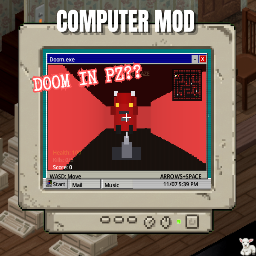
Project Zomboidにおいて、これまで用途が限られていたコンピューターを、完全に機能するインタラクティブなマシンに変えるMODです。このMODは独自のオペレーティングシステムを導入し、多様なアプリケーションやファイルシステムを通じて、ゲーム内に新たなインタラクションと深みをもたらします。
このMODで何が変わるか
ゲーム内のコンピューターが単なる解体可能なオブジェクトから、以下の機能を持つ実用的なデバイスへと変化します。
* **オペレーティングシステムの導入と操作:** OSのインストール、パスワード設定、BIOSからのディスクリセットが可能になります。
* **多様なアプリケーションの利用:**
* **ブラウザ:** ウェブサイトを閲覧し、ゲームやファイルをダウンロードできます。
* **ゲーム:** 17種類以上のゲームをコンピューター上でプレイ可能で、退屈、ストレス、悲しみを軽減します。
* **メール、掲示板、チャット:** 他のプレイヤーとのコミュニケーションや情報共有が可能です。
* **マーケット:** アイテムの売買やジョブの完了によるお金稼ぎができます。
* **Notepad, Paint, Calculator, Music Player:** 日常的なタスクやクリエイティブな活動を行えます。
* **ファイルシステムとCDの利用:** フォルダの作成、ファイルの名前変更、移動、削除、ゴミ箱からの復元、デスクトップの整理が可能です。空白のCDにファイルを保存したり、ゲームを書き込んだりできます。
* **情報収集とスキル習得:** コンピューター内にレシピ雑誌、新聞、ビデオファイルを見つけたりダウンロードしたりして、情報を得たりスキルを習得したりできます。
* **パスワード保護とハッキング:** 一部のコンピューターはパスワードで保護されており、パスワードを知る、BIOSからリセットする、または電気レベル1とPassword Hack CDを用いたミニゲームで解除する方法があります。
* **インターネット停電システム:** ワールドの電力状況に応じてインターネットが利用できなくなることがあります。マップ内のリレー端末を電気スキルと電子部品で修理し、発電機で電力を供給することでネットワークを復旧させる必要があります。このシステムはサンドボックスオプションで調整・無効化が可能です。
* **カスタマイズ:** コンピューター名、プロフィール画像、パスワード、デスクトップ背景色、日付/時計形式、ファイルレイアウトなどを変更できます。
想定されるメリット(推定)
* **ロールプレイングの強化:** サバイバル生活に、コンピューターを通じた情報収集、娯楽、社交といった新たな側面が加わり、より没入感のある体験ができると考えられます。
* **サバイバル生活のQoL向上:** ゲームやビデオを通じて退屈、ストレス、悲しみを効果的に管理できるため、精神状態の維持に役立つ可能性があります。レシピ雑誌をダウンロードすることで、物理的な雑誌を探す手間が省けることも考えられます。
* **マルチプレイヤーでの交流促進:** メール、掲示板、チャット、マーケットといった機能により、他のプレイヤーとのコミュニケーションや協力、経済活動が活発になることが期待されます。
* **新しいゲーム内アクティビティの追加:** ミニゲームのプレイ、コンピューターのハッキング、インターネット復旧のためのリレー修理など、通常のサバイバルとは異なる目標や課題が追加されるため、ゲームプレイの多様性が増すと考えられます。
* **物資収集の新たな動機付け:** 空白のCD、OSディスク、電子部品、Password Hack CDなど、コンピューター関連のアイテムが貴重な物資となり、探索のモチベーション向上に繋がる可能性があります。
想定されるデメリット・注意点(推定)
* **リソース管理の複雑化:** OSディスクや空白のCD、電子部品などの新しいアイテムが出現し、これらを管理する必要が生じる可能性があります。
* **ゲームプレイの学習曲線:** OSのインストール手順、アプリケーションの使い方、インターネット復旧の仕組みなど、覚えるべき新しい情報が多く、慣れるまでに時間がかかる可能性があります。
* **インターネット停電による不便さ:** インターネットが停止した場合、一部の機能(ウェブ閲覧、ダウンロード、マーケット、遠隔でのコミュニケーションなど)が利用できなくなり、復旧作業に手間がかかる可能性があります。特にソロプレイでは負担となるかもしれません。
* **マルチプレイヤーでのトラブルの可能性:** 掲示板やチャットが荒らし行為に利用されたり、マーケットでの競合や不正行為が発生したりする可能性も考慮する必要があります。
* **データ喪失のリスク:** パスワード保護されたコンピューターをBIOSからリセットすると、OSとローカルデータが削除されるため、誤操作には注意が必要です。
* **アーリーアクセス段階のMODであること:** 現在も開発途上であるため、今後機能の追加や変更が行われたり、予期せぬバグが発生したりする可能性があります。
向いている人(推定)
* Project Zomboidの世界でより深いロールプレイング体験を求めるプレイヤー。
* サバイバル生活に娯楽や社交、情報収集といった新たな要素を取り入れたいプレイヤー。
* マルチプレイヤーで他のプレイヤーとの多様な交流(チャット、取引、情報共有など)を楽しみたいプレイヤー。
* ゲーム内のミニゲームや、コンピューターのハッキング、ネットワーク修理といった新しいメカニクスに挑戦したいプレイヤー。
* 特定のスキル(電気など)の育成に新たな目的を見出したいプレイヤー。
* ゲームに少々の複雑性が加わることを厭わず、新しいシステムを学ぶことに意欲的なプレイヤー。
向いていない人(推定)
* Project Zomboidの基本的なサバイバル、戦闘、探索に特化したシンプルなゲームプレイを好むプレイヤー。
* ゲーム内のシステムや物資管理が複雑化することを避けたいプレイヤー。
* マルチプレイヤーでの交流や、ゲーム内の静的な活動にあまり関心がないプレイヤー。
* インターネット停電システムやOSのインストール、ハッキングミニゲームといった追加要素に時間を費やしたくないプレイヤー。
* まだ開発中のMODであることに不安を感じるプレイヤー。
総合評価(暫定)
* おすすめ度:★★★★☆
* 根拠:Project Zomboidの既存のコンピューターを多機能な実用機に変え、ロールプレイング、情報収集、エンターテイメント、マルチプレイヤーでの交流など、幅広い新しいゲームプレイ要素を追加します。退屈やストレスの軽減、スキルレベルに応じたハッキング、ネット障害システムの導入など、ゲームの世界観に深く統合された機能が多く、ゲーム体験を大きく拡張する可能性を秘めています。まだ開発途上であるものの、その豊富な機能と今後の発展性から、Project Zomboidに新たな深みと遊びの幅をもたらす非常に魅力的なMODであると判断できます。
※この説明文はAIによる自動翻訳です。正確な情報は下記の原文またはSteam Workshop公式ページをご確認ください。
原文を見る(英語)
A Project Zomboid mod that turns useless computers into fully functional machines.
[hr][/hr]
About This Mod
Computers in Project Zomboid usually do not do much besides being dismantled. This mod changes that.
Computer Mod adds usable computers with their own operating system. You can install an OS, set passwords, browse websites, download and install games, read magazines and newspapers, watch video files, use apps, burn CDs, store files, and communicate with other players.
[hr][/hr]
Features
Playable Games
There are currently 17 playable games. Some computers may already have games installed, while others may have none.
Games can be installed in two ways:
Game CDs: Find a game CD, insert it into a computer, and install it through My Files.
Internet downloads: Open the browser, visit knoxshare.bbs, download a game, then install it from the Downloads folder.
Downloads take time. You do not need to stay next to the computer while downloading, but shutting the computer down will cancel the download.
Playing games reduces boredom, stress, and sadness. Losing a game slightly increases stress.
[hr][/hr]
Applications
A fresh OS includes My Files, Notepad, Browser, Paint, Calculator, Mail, Board, Chat, Market, Settings, and Music Player.
Mail: Create an account, log in from different computers, send mail, reply, and delete messages.
Board: Post public messages that other players with computers can read.
Chat: Create an account, send requests, and privately message other players.
Market: Create a market account, buy rotating shop items, and complete jobs for money. Shop items and jobs refresh over time and are shared across computers on the server.
Paint: Draw simple images and save them as desktop files.
[hr][/hr]
Folder, File and CD System
Computers now have a more functional file system. You can create folders, rename them, delete them, move files, restore files from Trash, and organize your desktop.
Folders can contain notes, paint files, magazines, newspapers, video files, and other readable or downloadable files.
Blank CDs can be found in the world. CDs can be opened from My Files, renamed, wiped, used to store files, or used to burn installed games. Removed CDs keep their name and stored content.
Applications cannot be copied into folders or CDs, but files can.
[hr][/hr]
Magazines, Newspapers and Videos
Computers found in the world may contain recipe magazines, newspapers, or video files. Reading or watching them takes time and can affect your character.
Recipe magazines can teach the same things as their physical versions. Some hidden websites also allow you to download magazines or videos. Hidden site addresses may be found naturally inside notes or emails.
[hr][/hr]
Passwords, BIOS and OS Installation
Some computers may be password protected. There are three ways to access them:
Know the password.
Reset the disk from BIOS.
Use a Password Hack CD.
To hack a password, insert a Password Hack CD and start the hacking process from the login screen. Complete the mini-game to remove the password. By default, hacking requires Electrical level 1.
Warning: Resetting the disk deletes the operating system and local data.
If a computer has no OS, it cannot boot normally. Find a PZ OS 3.1 CD, insert it, enter BIOS during boot, and install the operating system from the CD.
[hr][/hr]
Internet Outage System
Internet access can be affected by world power. If the power grid goes down, the internet backbone can go offline depending on sandbox settings.
To restore the network, players must find special relay terminals around the map and repair them with Electrical skill and electronic parts.
If relay power is required, the active relay must keep receiving electricity, such as from a generator. If that generator runs out of fuel, the network can go offline again.
This system can be adjusted or disabled in sandbox options.
[hr][/hr]
Customization
You can change the computer name, profile picture, password, desktop background color, date format, clock format, and file layout.
Desktop icons and folders can be moved on a grid.
[hr][/hr]
Translations
The mod includes translation files for:
English, French, Italian, German, Spanish, Danish, Dutch, Hungarian, Norwegian, Polish, Portuguese, Russian, Turkish, Japanese, Simplified Chinese, Brazilian Portuguese, Finnish, Korean, Thai, Traditional Chinese, and Ukrainian.
[hr][/hr]
Early Access Notice
This mod is still growing. It became much bigger than I originally expected, and I am developing and testing it mostly alone. The mod is playable, but more features and improvements may be added over time.
[hr][/hr]
Roadmap & Known Bugs
[hr][/hr]
Upcoming Mod
[hr][/hr]
Permissions
Please do not reupload, redistribute, or share modified versions of this mod without my permission.
You are free to use this mod on your server through the original Steam Workshop page. Editing the files and distributing them through Discord, modpacks, private server packs, or any other platform without permission is not allowed.
For compatibility patches, translations, server-specific edits, or addons based on this mod, please contact me first.
Unauthorized edits or reuploads may be reported.
[hr][/hr]
My Other Mods: https://steamcommunity.com/sharedfiles/filedetails/?id=2795331647
Thank you for checking it out.
Workshop ID: 3725497089
Mod ID: ComputerModkum
Workshop ID: 3725497089
Mod ID: ComputerModkum
このMODはSteam Workshopで公開されています。ダウンロード・詳細は公式ページをご確認ください。