- 対応バージョン:不明
- サブスクライバー数:88
- 最終更新:2026-08-06 23:35:01 UTC
- 制作者:76561197970762699
MOD説明(日本語)
MOD概要
MOD名: StatMan
種類: RE_Kenshi用のUI拡張プラグインMOD
必須MOD: RE_Kenshi 0.3.4以降
このMODは、Kenshiのスキルバー表示と管理を大幅に強化し、追加のUI機能を提供するものです。主な機能は以下の通りです。
– キャラクターごとに完全にカスタマイズ可能なスキルバーの表示。
– スキルバーの自由な配置、サイズ変更、色変更。
– 複数のスキルバーをまとめて移動・サイズ変更できるスタック(グループ化)機能。
– ゲームUI(HUDパネルなど)へのスキルバーのスナップ機能。
– 各キャラクターのスキルバー設定を独立して記憶し、レイアウトプロファイルとして保存・適用できる機能。
– 新規キャラクターがデフォルト、バーなし、または指定のプロファイルで開始する設定。
– 現在のレイアウトを部隊全体または全キャラクターにコピーする機能。
– ゲームのUI非表示キー(F7)に連動して、スキルバーや設定UIも非表示にする機能。
– スキル経験値獲得時にのみスキルバーを一時的に表示するオプション。
– ポーズ中に敵にカーソルを合わせると、名前、派閥、状態、全スキルレベルを表示する情報ウィンドウ。
このMODで何が変わるか
– **スキルバーの表示と操作:**
– 各スキルバーは独立して画面上の任意の位置にドラッグして配置できます。
– 複数のスキルバーをドラッグでまとめると、一単位として移動・サイズ変更できるスタックを形成します。
– 各スキルバーの色を16色パレットから個別に選択し、右クリックで戻すことができます。
– バーの右端をドラッグすることで幅を調整でき、スタック全体も一緒にサイズ変更されます。
– バーをスタックに挿入する際、リアルタイムで挿入位置がプレビューされ、スムーズなアニメーションで並べ替えられます。
– バーを画面の端、他のスタック、またはKenshiのHUDパネル(部隊バーやキャラクターウィンドウなど)にスナップさせて配置できます。
– スタック内のバー間の間隔を調整できます。
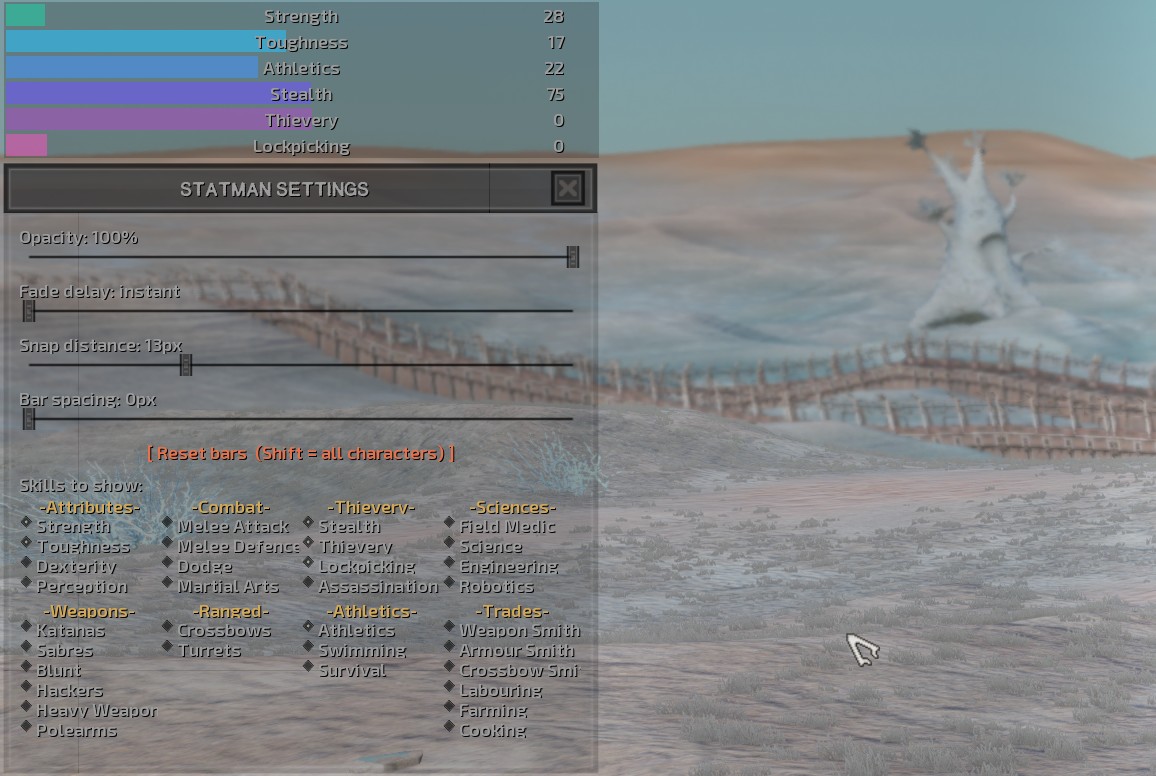
– スキルバーがアクティブでない時の不透明度(25-100%)、フェード遅延、スナップ距離、バー間隔などの詳細設定が可能です。
– Field Medicバーが正しくスキル値を表示するようになります(以前は0に固定されていた問題が修正されます)。
– **キャラクターと設定の管理:**
– 各キャラクターは自身のスキルバーの設定(表示するスキル、位置、色、幅)を個別に記憶します。
– 別のキャラクターを選択すると、そのキャラクター固有のスキルバーレイアウトに自動で切り替わります。部隊を選択している場合は、リーダーの設定が表示されます。
– キャラクターが死亡すると、そのキャラクターの設定はクリアされます。
– 4つのレイアウトプロファイルスロットが提供され、クリックで現在のキャラクターに適用、Shift+クリックで現在の設定を保存できます。これにより、役割に応じたレイアウト(例:戦闘員用、農民用、盗賊用)を素早く切り替えられます。
– 初めて設定する新規キャラクターが「組み込みのデフォルト」「バーなし」「保存済みのプロファイル」のいずれでスキルバーを表示開始するかを選択できます。
– 現在のレイアウトを、選択中のキャラクターが属する部隊、またはShift+クリックでゲーム内の全キャラクターにコピーできます。
– 現在のキャラクターの設定、またはShift+クリックで全キャラクターの設定をリセットできます。
– **追加のUI機能と利便性:**
– 設定画面はKenshiのキャラクターシートのようにスキルカテゴリでグループ化され、見やすく再設計されています。
– 設定画面は画面上の好きな場所にドラッグできる歯車ボタンで開き、Escキーで閉じることができます。
– ゲームのUI非表示キー(F7)を押すと、スキルバー、歯車ボタン、設定ウィンドウもまとめて非表示になります。これにより、クリーンなスクリーンショットを簡単に撮影できます。
– スキルが経験値を獲得したときにのみスキルバーがフェードイン・フェードアウトするように設定でき、常時表示ではなく、スキルの進捗を「静かな信号」として受け取れます(隠れているバーにカーソルを合わせると表示されます)。
– バーのラベルの色を、バニラのデフォルト色と16色のバーカラーから選択できます。
– ゲームがポーズ中に敵にカーソルを合わせると、その敵の名前、派閥、状態、および全33スキルレベルが表示される情報ウィンドウが現れます(ポーズ中のみの機能です)。
想定されるメリット(推定)
– スキルの成長状況をリアルタイムかつ視覚的に把握しやすくなり、キャラクター育成の効率が向上すると考えられます。
– UIをプレイヤーの好みに合わせて細かくカスタマイズできるため、視覚的な快適性や操作性が向上する可能性があります。
– レイアウトプロファイルにより、キャラクターの役割(戦闘員、農夫、窃盗犯など)に応じたスキル情報を素早く表示・切り替えられ、多様なプレイスタイルに対応しやすくなります。
– スクリーンショット撮影時に邪魔なUI要素を一括で非表示にできるため、手軽に高品質な画像を撮影できると考えられます。
– スキル経験値獲得時のみバーが表示される機能は、画面の乱雑さを避けつつ、スキルの成長を視覚的に通知する優れた手段となる可能性があります。
– ポーズ中限定ではありますが、敵の詳細なスキル情報を確認できることで、戦闘前の戦略立案やキャラクターのビルド調整に役立つ可能性があります。
想定されるデメリット・注意点(推定)
– このMODは「RE_Kenshi 0.3.4以降」が必須であるため、まずその前提MODを導入する手間が発生する可能性があります。
– 多くのカスタマイズオプションが提供されているため、初期設定や自分の好みに合わせるための調整に時間がかかる可能性があります。
– UI要素が増えるため、設定によっては画面が cluttered(ごちゃごちゃ)に見える可能性があります(ただし、カスタマイズにより回避可能です)。
– 未署名プラグインであるため、Windows Smart App Controlや一部のアンチウイルスソフトによってStatMan.dllが隔離される可能性があり、手動での復元や許可が必要になる場合があります。
– ポーズ中に敵情報を確認する機能は、リアルタイム戦闘中には利用できないため、戦闘中のステータス確認を目的としている場合は注意が必要です。
– 他のUI変更MODやRE_Kenshiプラグインと競合する可能性がごくわずかながら存在します。
向いている人(推定)
– Kenshiのスキル育成を重視し、進捗を詳細に把握したいプレイヤー。
– ゲームのUIを自分好みに徹底的にカスタマイズしたい、UI設定にこだわるプレイヤー。
– 複数のキャラクターを育成し、それぞれの役割に応じた効率的な情報表示を求めるプレイヤー。
– ゲームのスクリーンショットを頻繁に撮影し、UIなしのクリーンな画像を簡単に撮りたいプレイヤー。
– 戦闘前に敵の能力を詳細に分析し、戦略を練ることを好むプレイヤー。
– 普段は画面をすっきりと保ちつつ、スキルの成長時のみ通知を受け取りたいプレイヤー。
向いていない人(推定)
– MODの導入や設定に手間をかけたくない、バニラのシンプルなUIで満足しているプレイヤー。
– リアルタイムで敵のステータスを読み取って戦闘中に有利に進めることを期待するプレイヤー(このMODではポーズ中のみの機能のため)。
– 必須MODであるRE_Kenshiの導入自体に抵抗がある、あるいはその仕組みを理解したくないプレイヤー。
総合評価(暫定)
– おすすめ度:★★★★★
– 根拠:Kenshiのスキル管理とUIカスタマイズにおいて、非常に高い機能性と利便性を提供するMODです。キャラクターごとの設定記憶、レイアウトプロファイル、動的なバー表示、ポーズ中の敵情報表示など、Kenshiプレイヤーが長年求めていたであろう多岐にわたる機能が実装されています。RE_Kenshiが必須という制約はありますが、その導入の手間を補って余りあるメリットがあり、ゲーム体験を大きく向上させる強力なツールとなり得ると考えられます。
※この説明文はAIによる自動翻訳です。正確な情報は下記の原文またはSteam Workshop公式ページをご確認ください。
原文を見る(英語)
– Free-floating bars. Each skill bar is independent — drag any bar anywhere on screen.
– Snapping & clusters. Drag bars together and they snap into a neat stack that moves as one unit. Pull them apart
anytime.
– Per-character setups. Every character remembers its own bars — which skills, positions, colors, widths. Select a
different character and the overlay swaps to theirs. A squad selection shows the leader’s. When a character dies,
their setup is cleared.
– Per-bar colors. Left-click a bar to cycle a 16-color palette, right-click to go back (default green).
– Resizable width. Grab a bar’s right edge (a grip appears on hover) and drag. A whole stack resizes together, and a
bar joining a stack takes on the stack’s width.
– Reorder with a live preview. Pull a bar out and drag it back in — a gap opens showing exactly where it’ll land
before you release, with smooth animations. Adding to the top/bottom leaves the rest in place; only a middle insert
shifts bars aside.
– Snap to the game UI. Bars snap to screen edges, your other stacks, and Kenshi’s HUD panels — tuck them beside the
squad bar or character window. The side you grab decides which edge snaps.
– Adjustable spacing between bars in a stack.
– Redesigned settings laid out like Kenshi’s character sheet (skills grouped by category). A draggable gear button
opens settings and works even with zero bars. Escape closes it.
– More controls — idle opacity (25–100%), fade delay, snap distance, bar spacing.
– Reset — one character, or Shift-click to reset all characters (with confirmation).
– Fixed: the Field Medic bar now reads correctly (was stuck at 0).
Controls
– Drag a bar — move it (snapped bars move as one stack).
– Shift + drag — pull one bar out of a stack.
– Drag onto a stack — gap previews the insert spot; release to drop.
– Left-click — next color; Right-click — previous color.
– Grab the right edge — resize width (whole stack).
– Grab a side/corner + drag near an edge — snap to screen / another stack / HUD panel.
– Gear — open settings; Escape — close.
What’s new in 2.1
Layout profiles. Four numbered slots in settings. Click a slot to apply that layout to the character on screen; Shift-click to save the current setup into it. Set up a fighter layout, a farmer layout, a thief layout, and switch any character over in one click.
Choose what new characters start with. A settings row picks what a character you’ve never configured begins with: the built-in defaults, no bars at all, or any profile you’ve saved. If you’ve been resetting every recruit that joins, set it once to “no bars” and you’re done. Requested by Shroomma.
Copy a layout to your squad. The copy button now applies to the selected character’s squad; Shift-click widens it to every character. Both scopes are named on the button and in the confirmation, so there’s no guessing which one you’re about to do. Requested by Bluecivious.
Hide bars and menu with the game HUD. Turn this on and pressing your hide-UI key (F7) takes the bars, the gear button and the settings window with it — clean screenshots, no fiddling. Requested by Aksej, Alpha and Antsan.
Show a bar only when that skill gains XP. Bars stay invisible until the skill actually trains, then fade in and fade back out. Turns the overlay into a quiet “something just improved” signal instead of a permanent fixture. Hovering a hidden bar still reveals it. Requested by DubstepEpic.
Bar label colour. A swatch in settings cycles the label colour through the vanilla default plus all 16 bar colours; right-click steps back. Requested by Bluecivious.
Enemy info window on hover. With the game paused, hover an enemy to see their name, faction, state and all 33 skill levels. Pause-only by design, so it can’t be used to read enemy stats mid-fight. Requested by tantananan.
Fixed: the settings window now re-centres after it resizes, so it can’t hang off the bottom edge on shorter screens.
Every new feature above is off by default — tick what you want in settings and nothing else changes.
Controls
Drag a bar — move it. Bars snapped together move as one stack.
Shift + drag — pull a single bar out of a stack.
Left-click a bar — next colour. Right-click — previous colour.
Grab the right edge — resize the bar’s width (the whole stack resizes).
Profile slot — click to apply, Shift-click to save into it.
Copy layout — click for the current squad, Shift-click for all characters.
Reset — click for this character, Shift-click for all characters.
Gear button — open settings. Escape — close settings.
Requirements
RE_Kenshi 0.3.4 or newer — StatMan is a RE_Kenshi plugin. Install RE_Kenshi first: https://www.nexusmods.com/kenshi/mods/847
Troubleshooting
Nothing appears? Install RE_Kenshi and StatMan from the same place — both from the Workshop, or both in your local Kenshi/mods folder. Mixing sources can stop the plugin loading. Also make sure a character is selected.
Can’t find settings? Look for the small gear button near the top-left; drag it somewhere handy — its position is saved.
Still nothing? Windows Smart App Control or your antivirus may have quarantined StatMan.dll (it’s an unsigned plugin). Allow/restore it and re-enable the mod.
Notes
Looking for a skill you can’t find? The picker groups skills the way Kenshi’s own character sheet does — Survival is under Athletics, for instance.
Bars follow the currently selected character; each character has an independent layout.
Settings save to %LOCALAPPDATA%\StatMan\statman.cfg. Upgrading from 2.0 keeps your existing setups.
このMODはSteam Workshopで公開されています。ダウンロード・詳細は公式ページをご確認ください。