- 対応バージョン:0.34
- サブスクライバー数:2805
- 最終更新:2026-07-28 13:55:19 UTC
- 制作者:76561197962550502
MOD説明(日本語)
MOD概要
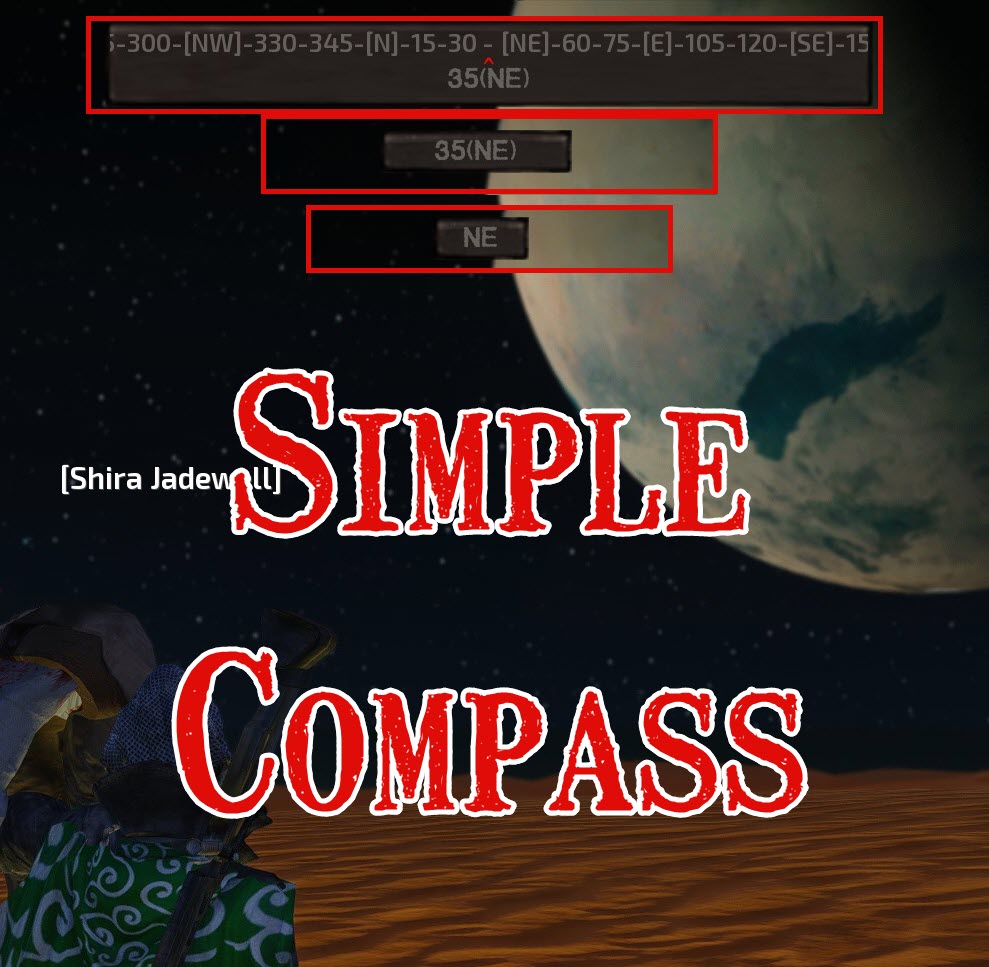
Kenshiにコンパクトでクリック可能なコンパスHUD要素を追加するMODです。ゲーム画面の最上部に表示され、現在のキャラクターの向きを度数と方角で示します。クリックで3種類の表示モード(Full、Number with Direction、Direction Only)を切り替えることが可能です。ゲームのHUDを非表示にすると、コンパスも非表示になります。
このMODの動作には以下の要件があります。
* 必須MOD: RE_Kenshi (v0.34でテスト済み)
* Kenshiのバージョン: v1.0.65以上
本MODは、追加するコンパスウィジェット以外、既存のゲームファイルやUI要素を変更しません。
このMODで何が変わるか
* ゲーム画面のトップ中央に、キャラクターの現在の方角を示すコンパスHUDが表示されるようになります。
* このコンパスをクリックすることで、「Full(詳細な度数と方角)」「Number with Direction(度数と方角の簡略表示)」「Direction Only(方角のみの最小表示)」の3種類の表示モードを切り替えることができます。
想定されるメリット(推定)
* 広大なKenshiの世界で方角を把握しやすくなるため、探索や目的の場所への移動がよりスムーズになると考えられます。
* マップが未開拓な地域や、目印の少ない砂漠などの環境下で方向を見失うリスクが軽減されると推定されます。
* 目視による方角確認の手間が省けるため、ゲームプレイの快適性が向上する可能性があります。
* 3種類の表示モードを切り替えることで、HUDの視認性と情報量のバランスをユーザーの好みに合わせて調整できると考えられます。
* 既存のゲームファイルやUI要素をほとんど変更しないため、他のMODとの競合が起こりにくいと推定されます。
想定されるデメリット・注意点(推定)
* 必須MODとしてRE_Kenshiが必要となるため、RE_Kenshiを導入していないプレイヤーは追加の導入手順が発生します。
* 画面上部に新たなHUD要素が追加されるため、HUDを極力シンプルに保ちたい、または情報を少なくして没入感を重視したいプレイヤーにとっては、邪魔に感じる可能性があります。
* コンパス表示によって、Kenshiが意図する「迷う」体験や、地形を覚えて進む楽しさが損なわれると感じるプレイヤーもいるかもしれません。
* RE_KenshiのバージョンやKenshi本体の将来的なアップデートによっては、MODの動作が不安定になる可能性や、互換性が失われる可能性がゼロではありません。
向いている人(推定)
* 広大なKenshiの世界で方向感覚を失いやすいと感じる人。
* 特定の目的地へ効率的に、または迷うことなく移動したいと考える人。
* 探索時の利便性を向上させたい、ゲームプレイを快適にしたい人。
* HUDに多少の情報が増えても気にならない人、または表示をカスタマイズしたい人。
* ミニマップやナビゲーション機能に慣れているゲームプレイヤー。
向いていない人(推定)
* HUD要素を極限まで減らして、より高い没入感を重視したい人。
* Kenshiの地形を自力で把握し、自分の方向感覚だけを頼りに冒険するスリルを楽しみたい人。
* 必須MODであるRE_Kenshiの導入を避けたい、またはRE_Kenshiとの相性問題を懸念する人。
総合評価(暫定)
* おすすめ度:★★★★☆
* 根拠:必須MODの導入は必要ですが、ゲームプレイの利便性を大幅に向上させるシンプルな機能を提供しており、他のMODとの競合が少ないと明記されているため。Kenshiの世界での移動のストレスを軽減したいプレイヤーには非常に有効なMODであると推定されます。
※この説明文はAIによる自動翻訳です。正確な情報は下記の原文またはSteam Workshop公式ページをご確認ください。
原文を見る(英語)
Never lose your bearings in Kenshi again. Simple Compass adds a compact, clickable compass HUD element to the top of the game screen showing your current heading in degrees and cardinal direction.
Requirements
RE_Kenshi (tested on v0.34)
Kenshi v1.0.65+
How to Use
Load any save or start a new game
Look at the top-center of the screen – the compass is always visible (unless the player hides the game HUD)
Click the compass button to cycle between display modes
Display Modes
Full: A rotating compass strip with tick marks for every 15 degrees, cardinal direction labels (N, NE, E, SE, S, SW, W, NW), a red caret indicator pointing at your exact bearing, and the numeric bearing with direction name below
Number with Direction: Compact display showing just the bearing in degrees and the direction name (e.g. “45(NE)”)
Direction Only: Minimal display showing only the cardinal or intercardinal direction (e.g. “N”, “SE”)
Features
Non-intrusive – Designed to be simple, small and placed near the top of the screen, out of the way
Use the display mode you like best – Click the compass to switch between Full, Number with Direction, and Direction Only modes
Compatibility
No special load order required beyond RE_Kenshi
Does not alter any game files or UI elements beyond the added compass widget
Troubleshooting
Confirm RE_Kenshi is installed and enabled
If the compass does not appear, verify the mod is activated in the launcher
Check Out All My Mods
Rename Buildings, Lets you rename all player-owned buildings in Kenshi.
Simple Compass, Never lose your bearings in Kenshi again. A compass HUD element showing your current heading in degrees and cardinal direction.
Fix Shopping Wages, gives most NPCs their daily allowance so they keep buying from player shops.
Medic Button Splint Rigging, Adds the “Splint Rigging” job when shift-clicking the medic button.
Shout outs
BFrizzleFoShizzle, the creator of KenshiLib and RE_Kenshi. Without either, this mod would not exist.
Emkej, the creator of Job-B-Gone. Used as a base for understanding how to hide the compass when the main UI is hidden.
このMODはSteam Workshopで公開されています。ダウンロード・詳細は公式ページをご確認ください。