- 対応バージョン:不明
- サブスクライバー数:320093
- 最終更新:2026-08-21 15:02:54 UTC
- 制作者:76561198038726337
MOD説明(日本語)
MOD概要
Spawn Selectorは、Project Zomboidの固定されたスポーン地点リストを、世界地図全体から選択できるシステムに置き換えるMODです。プレイヤーはキャラクター作成後、広大な地図上から任意かつ正確な開始位置を選択してゲームを開始できます。このMODはソロプレイとマルチプレイの両方に対応しており、有効化されている互換性のあるマップMODも自動的に表示されます。
このMODで何が変わるか
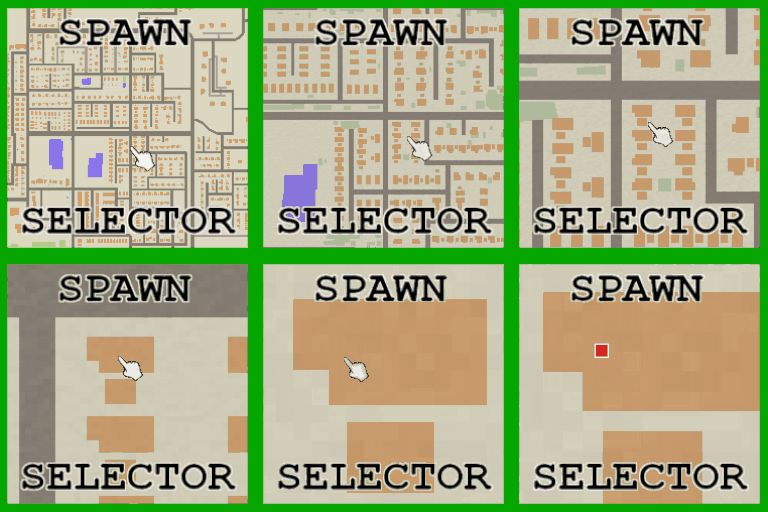
– キャラクター作成後の開始地点選択が、固定リストではなく、世界地図上から自由に任意の場所を選択する方法に変わります。
– マップ上でのパン(移動)とズームが可能です。
– 標準マップとBuild 42の詳細な地形ビューを切り替えられます。
– 建物内のフロア(地上階、上層階、地下など)を選択してスポーンできます。
– ズームアウト時には町名が表示され、ズームイン時には建物タイプを識別できる色分けされたポイントオブインタレスト(POI)が表示されます(サーバー設定で無効化可能)。
– 選択した建物の鍵を任意で付与する機能があります(デフォルトで有効、サンドボックス設定で無効化可能)。
– Project Zomboidがネイティブでサポートする全言語のローカライズに対応しています。
– 隠された目的地座標を持つ、任意選択の「ランダムスポーンチャレンジモード」が追加されます。
– スタート地点選択リストの最上位に「Spawn Selector」が配置されます。
– キャラクターがスポーン地点を選択した後は、セレクターが再オープンすることはありません。
– **Death Zone Protection**: 以前のキャラクターが死亡した場所の近くへの再スポーンを、設定可能な半径と現実時間でブロックする機能が追加されます。
– **Building Type Blocking**: 9つの建物カテゴリ(武器・軍事、医療、法執行機関、小売・店舗、飲食、工業、住宅・宿泊施設、市民・公共、レクリエーション)ごとに、管理者またはホストが特定カテゴリの建物内への手動、ランダム、またはランダム建物スポーンを禁止できるサンドボックス設定が追加されます。
– スポーン時には一時的に隔離された待機場所へ移動し、選択後には短時間の猶予期間が設けられ、周囲のエリアのロード中に近くのゾンビや選択した部屋内のゾンビが排除されます。
– 屋内スポーンの場合、部屋の照明を自動的に点灯しようと試みます。
– 標準的なProject Zomboidの世界地図データを持つマップMODは自動的に互換性があると見なされ、表示されます。
– マルチプレイの場合、MODはサーバーと全ての接続クライアントにインストールされている必要があります。
– このMODはProject Zomboid Build 42を要件とします。
想定されるメリット(推定)
– プレイヤーは、ゲーム開始時から特定の戦略に基づいた場所(例:資源が豊富な地域、安全な場所、特定の種類の建物)を選択できるため、ゲームプレイの自由度と計画性が向上すると考えられます。
– 既存のマップMODを導入している場合でも、その広大な世界を最大限に活用し、どこへでも自由にスポーンできるため、探索の幅が広がると考えられます。
– マルチプレイにおいて、友人と同じ場所に集合してゲームを開始したり、特定の役割に応じた場所を選んだりするなど、連携やロールプレイがしやすくなると考えられます。
– 新規プレイヤーは比較的安全な場所や資源が豊富な場所から始めることで、ゲームへの導入がスムーズになると考えられます。
– 経験豊富なプレイヤーは、あえて危険な場所や特定のチャレンジングな場所から始めることで、新鮮なゲーム体験や高難易度なプレイを楽しむことができると考えられます。
– Death Zone Protection機能により、キャラクターが死亡した直後に同じ場所で再スポーンして即座に再び死亡する、といったフラストレーションを軽減できる可能性があります。
– サーバー管理者やホストは、Building Type Blocking機能を使って特定の建物タイプでのスポーンを禁止することで、ゲームバランスを調整したり、特定のプレイスタイルを推奨したりできると考えられます。
想定されるデメリット・注意点(推定)
– スポーン地点の選択肢が非常に多いため、特に新規プレイヤーはどこにスポーンすべきか迷い、決断に時間がかかる可能性があります。
– 意図的に非常に危険な場所を選択した場合、ゲーム開始直後に死亡するリスクが高まる可能性があります。
– サーバー管理者やホストがBuilding Type Blockingを設定した場合、プレイヤーのスポーン地点の自由度が制限される可能性があります。
– マップMODの種類によっては、世界地図データが不完全な場合や、サーバーとクライアント間で地図の表示が異なる場合に、地図が空白になったり、意図しない場所が表示されたりする可能性があります。
– このMODはProject Zomboid Build 42を前提としているため、それ以前のバージョンでは正常に動作しない可能性があります。
– Mod作成者がLua学習中であり、一部AIツールの支援を受けていると明記されているため、予期せぬバグや将来的な互換性問題が発生する可能性がゼロではないかもしれません。
向いている人(推定)
– 特定の開始戦略を持ってゲームを始めたいプレイヤー。
– ロールプレイを重視し、特定の場所から物語を始めたいプレイヤー。
– 新しいマップMODを導入しており、そのマップを最大限に活用したいプレイヤー。
– 難易度を自分で調整したい(非常に安全な場所や非常に危険な場所から始めたい)プレイヤー。
– マルチプレイで友達と特定の場所に集まって始めたいプレイヤー。
– 連続死亡によるフラストレーションを避けたいプレイヤー。
– サーバー管理者で、特定の建物をスポーン禁止にしたいバランス重視のホスト。
向いていない人(推定)
– ランダムなスポーン位置による偶発性や新鮮な驚きを常に求めるプレイヤー。
– 選択肢が多すぎることで決断に時間を要したくない、あるいはバニラのシンプルなスポーン選択で十分満足しているプレイヤー。
総合評価(暫定)
– おすすめ度:★★★★★
– 根拠:プレイヤーに圧倒的なスポーン地点の自由度を提供し、ゲームプレイの戦略性とカスタマイズ性を大きく向上させます。マップMODとの高い互換性、ソロ・マルチプレイ両対応、Death Zone ProtectionやBuilding Type Blockingといった利便性とバランス調整に役立つ機能が充実しており、ローカライズ対応も高評価です。要求される前提MODがなく、導入が容易である点も高く評価できます。
※この説明文はAIによる自動翻訳です。正確な情報は下記の原文またはSteam Workshop公式ページをご確認ください。
原文を見る(英語)
Spawn Selector replaces fixed spawn lists with a full world map.
Choose Spawn Selector from the starting-location screen, create your character as normal, then select your exact starting position before entering the world.
How It Works
Select Spawn Selector from the vanilla starting-location menu.
Complete sandbox settings, occupation, traits, and character creation normally.
Use the full world map to choose a starting position.
Click Spawn Here to move the character to the selected location.
The map cannot be closed until a location has been selected.
Features
Choose any mapped location instead of selecting from a predefined list.
Supports solo and multiplayer.
Automatically displays compatible enabled map mods.
Supports panning and zooming across the complete available world map.
Switch between the standard map and Build 42’s detailed terrain view.
Switch between floors to select if you are spawning on the ground floor (default) or upper floors/lower basements.
Displays town names while zoomed out to make navigating the world map easier.
Includes toggleable, colour-coded points of interest for identifying building types while zoomed in. Server owners can disable this feature through the sandbox settings.
Optionally gives players the matching key for the building they choose to spawn in. This is enabled by default and can be disabled through the sandbox settings.
Includes localisation for every language natively supported by Project Zomboid.
Optional Random Spawn challenge mode with hidden destination coordinates.
Places Spawn Selector at the top of the starting-location list.
Prevents the selector from reopening after a character has completed selection.
Death Zone Protection – optionally blocks a player from spawning back near where their previous character died, for a configurable radius and real-world duration.
Building Type Blocking: nine sandbox toggles (Weapons & Military, Medical, Law Enforcement, Retail & Shops, Food & Drink, Industrial, Residential & Lodging, Civic & Public, Recreation) let admins stop players from manually, randomly, or random-building spawning inside specific categories of building, e.g. gun stores or police stations.
Spawn Safety
The character is temporarily placed at an isolated staging location while the selection screen is open.
After selecting a destination, the mod provides a short arrival period while the surrounding area finishes loading. Nearby zombies and zombies inside the destination room are cleared during this period. If the selected position is indoors, the mod also attempts to switch on the room lights.
This prevents characters from being attacked before the player has control.
Map Mod Compatibility
Spawn Selector reads the map directories included in the current world. Compatible map mods with standard Project Zomboid world-map data should appear automatically.
For multiplayer, map mods must be installed and configured on the server. A map installed only on the client may appear differently or may not exist in the server world.
Map mods without world-map drawing data may exist in-game but appear blank in the selector.
Multiplayer Installation
Install the mod on the server and all connecting clients.
Restart the server after changing the mod list.
Requirements
Project Zomboid Build 42
No additional framework or dependency
Workshop Information
Workshop ID: 3772052709
Mod ID: SpawnSelector
Map Folder: Spawn Selector
Note: I am currently learning to code in Lua. Some aspects of this mod have been assisted with AI tools to help me in that process. All the code is tested, and reviewed and maintained by me.
I make these mods because I love this game and want to create fun things for the community. If you have feedback or find an issue, I’d really appreciate hearing it. Please be kind and constructive.
このMODはSteam Workshopで公開されています。ダウンロード・詳細は公式ページをご確認ください。