- 対応バージョン:不明
- サブスクライバー数:115478
- 最終更新:2026-09-28 21:30:32 UTC
- 制作者:76561199048860113
MOD説明(日本語)
MOD概要
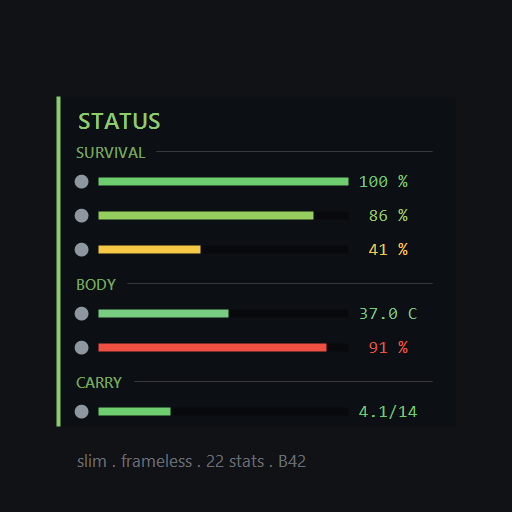
このMODは、Project Zomboidにおいて、メニューを開くことなく生存者の詳細なステータスを一目で確認できるHUDパネルを追加します。生存者の体調、精神状態、身体の状態、栄養状態に関する32種類のステータス(Health, Food, Water, Rest, Endurance, Fitness, Stress, Panic, Pain, Unhappy, Boredom, Anger, Morale, Nicotine Withdrawal, Idleness, Sanity, Body Temperature, Body Heat Generation, Wetness, Discomfort, Sickness, Infection, Fever, Drunk, Food Sickness, Poison, Carry Weight, Body Weight, Calories, Proteins, Carbs, Fat)を4つのカテゴリに分けて表示します。各ステータスはアイコン、状態を示すバー、および正確な数値で表示され、バーは状態の悪化に応じて色が変わります。
パネルはキーバインド(デフォルトで`;`または`U`)で表示・非表示を切り替えられ、右クリックで設定画面を開くことができます。パネルはドラッグして好きな場所に配置し、位置をロックすることが可能です。また、表示される情報の種類、レイアウト(縦リストまたは横ストリップ)、テキストサイズ、背景の透明度、数値の表示方法、ステータスの並び順やグループ化、アイコンやバーの表示有無など、多岐にわたるカスタマイズオプションが提供されています。特定の状態が悪いステータスのみを表示するオプションや、バニラのムードルアイコンを非表示にする機能も含まれています。
本MODはクライアントサイドのみで動作し、サーバーサイドのLuaやネットワークトラフィックを必要とせず、セーブデータに書き込むこともありません。既存のセーブデータにも追加可能ですが、Build 42以降の仕様により、既存セーブのMODリストで有効化する必要があります。サーバー管理者向けには、表示するステータスのロックや診断ツールの有効/無効を設定できるSandboxページが用意されています。28言語に完全対応しています。
このMODで何が変わるか
– **ステータス情報の常時表示:** メニューを開くことなく、体調、精神、身体、栄養に関する32種類の詳細なステータスをリアルタイムで確認できるようになります。
– **カスタマイズ可能なHUDパネル:** 縦リストまたは画面の上下端に固定する横ストリップ形式で表示でき、パネルのサイズ、位置、表示されるステータスの選択と順序、テキストサイズ、背景透明度などを自由に設定できます。
– **視覚的な情報提示:** 各ステータスはアイコンとバーで視覚的に表現され、状態が悪化するとバーの色が黄色から赤に変化します。正確な数値も表示され、カーソルを合わせるとフルネームが表示されます。
– **UIの最適化:** バニラのムードルアイコンと重複しないように非表示にするオプションや、現在問題のないステータスを自動的に隠す「Only show problems」機能が利用できます。
– **詳細な設定オプション:** ステータスバー上に次のムードルレベルの閾値を表示する「Threshold ticks」や、ゲーム内の生データとHUD表示を比較する診断ツール(サーバーで有効化可能)を利用できます。
– **キーバインドの追加:** ステータスパネルの表示/非表示(`;`または`U`)と、設定画面を直接開くためのキーバインドが追加されます。
– **マルチプレイ環境での動作:** クライアントサイドMODであるため、各プレイヤーが個別にインストール・有効化する必要があります。サーバー側でもMODが導入されていれば、管理者用の設定ページが利用可能になります。
想定されるメリット(推定)
– **情報収集の効率化:** メニューを開く頻度が減り、ゲームプレイがよりスムーズになると考えられます。これにより、特に緊迫した状況下での素早い状況判断に役立つ可能性があります。
– **危機管理能力の向上:** 自身のステータスを常に把握できるため、飢餓、脱水、疲労、病気などの危険な状態に陥る前に、予防的な行動を取りやすくなると考えられます。
– **カスタマイズによる快適性:** 豊富なカスタマイズオプションにより、プレイヤー自身の好みに合わせてHUDを最適化できるため、視認性や没入感を損なわずに必要な情報を得られると期待されます。
– **学習曲線の短縮:** ゲームに不慣れなプレイヤーでも、自身のキャラクターの状態を直感的に理解しやすくなり、ゲームへの適応が早まる可能性があります。
– **ロールプレイの深化:** キャラクターの細かな体調変化や精神状態を常に意識することで、よりリアルな生存者としての体験に繋がる可能性があります。
想定されるデメリット・注意点(推定)
– **画面の占有:** 常時表示する設定の場合、画面の一部がHUDパネルで占有され、特に狭い画面や多くのステータスを表示する設定では、周囲の視界がわずかに遮られる可能性があります。
– **情報過多の可能性:** 全てのステータスを同時に表示すると、情報量が多すぎてかえって混乱を招くプレイヤーもいる可能性があります。
– **キーバインドの競合:** デフォルトのキーバインド(`;`または`U`)が、他のMODやゲーム内の操作と競合する可能性があります。その場合、手動でキーバインドを変更する必要があります。
– **マルチプレイにおける認識齟齬:** クライアントサイドMODのため、導入していないプレイヤーとはHUDに関する認識が共有されません。サーバー管理用の設定ページは、サーバー側でMODが導入されている場合にのみ利用可能です。
– **既存セーブデータへの適用手順:** Build 42以降、既存のセーブデータにMODを追加する際は、メインメニューだけでなく、ロード画面の「Choose Mods…」からも手動で有効化する必要があるという注意点があります。
向いている人(推定)
– **詳細な情報と効率性を重視するプレイヤー:** 常にキャラクターの正確な状態を把握し、メニューを開く手間を省きたいプレイヤー。
– **高難易度でのサバイバルを好むプレイヤー:** わずかなステータス変化も見逃さず、危機を未然に防ぎたいプレイヤー。
– **UIのカスタマイズが好きなプレイヤー:** 自分のプレイスタイルに合わせてHUDを細かく調整したいプレイヤー。
– **マルチプレイで連携を重視するプレイヤー:** 自身の状態を素早く確認し、チームメイトと共有したいと考えるプレイヤー。
向いていない人(推定)
– **ミニマリストなUIを好むプレイヤー:** 画面上に余計な要素を一切表示したくない、極力UIを排除して没入感を重視するプレイヤー。
– **情報過多にストレスを感じるプレイヤー:** 多くのステータスが常に表示されることで、かえってゲームプレイに集中できないと感じるプレイヤー。
– **バニラのゲーム体験を重視し、UIの変更を好まないプレイヤー:** ゲーム本来のUIデザインにこだわりがあり、MODによる変更を受け入れたくないプレイヤー。
総合評価(暫定)
– おすすめ度:★★★★★
– 根拠:メニューを開かずに詳細なステータス情報を常に視覚的に提供できる点は、Project Zomboidのゲームプレイにおける利便性と危機管理能力を大幅に向上させます。32種類ものステータスを網羅し、レイアウト、表示内容、色、サイズなど、非常に豊富なカスタマイズオプションを提供しているため、あらゆるプレイヤーの好みに合わせてUIを最適化できます。クライアントサイドのみで動作し、セーブデータへの影響が少ないため導入・運用が容易であり、多言語対応も充実しています。サブスクライバー数は不明ですが、その機能性から非常に有用なMODであると評価できます。
※この説明文はAIによる自動翻訳です。正確な情報は下記の原文またはSteam Workshop公式ページをご確認ください。
原文を見る(英語)
Press ; – the key just right of L – to show or hide the panel. That’s it, nothing else to set up. On a non-US keyboard that key carries a different symbol, so go by its position, or set your own under Options – Key Bindings.
Already had the mod installed? Yours is still on U. The game keeps a key binding once it has one, so only new installs pick up the new default. Change either of them under Options – Key Bindings – “Toggle Status HUD”.
Quick start: ; toggles the panel (or U if you had the mod before) – press it again if the panel vanishes on you – right-click it for Settings – drag it anywhere and lock the position once you like where it sits.
Seeing everything twice? Settings, Layout, “Hide vanilla moodles” switches the game’s own icons off – this panel already covers them.
Adding it to a save you already started? Build 42 gives every save its own mod list, so ticking the mod in the main menu does not switch it on in an existing world – on the Load Game screen, pick your save and use “Choose Mods…” to tick it there as well. Otherwise nothing appears and the key does nothing, which looks exactly like a broken mod. It is the most common reason it “doesn’t work”.
What it shows
32 stats in 4 groups. Turn any of them on or off.
Survival – Health, Food, Water, Rest, Endurance, Fitness
Mental – Stress, Panic, Pain, Unhappy, Boredom, Anger, Morale, Nicotine Withdrawal, Idleness, Sanity
Body – Body Temperature, Body Heat Generation, Wetness, Discomfort, Sickness, Infection, Fever, Drunk, Food Sickness, Poison
Nutrition – Carry Weight, Body Weight, Calories, Proteins, Carbs, Fat
Each row: icon, a bar that turns yellow then red as it gets worse, and the exact number. Hover a row for the full name.
Make it yours
Right-click the panel – Settings, in four tabs. Everything updates live, so you see the change before you close the window.
Hover anything in Settings for a one-line explanation of what it does – every stat and every option
Vertical list, or a horizontal strip along the top/bottom edge
Text sizes read from your machine’s own fonts, marked * where they are drawn perfectly sharp; 16 width steps; background down to fully invisible
Choose where the stat name goes: off, auto (trimmed so the bar keeps a usable width), full, or drawn inside the bar
Put the number beside the bar, inside it so the bar runs the full row, or switch it off for bars only – hovering a row still shows the exact figure
Group stats by category or order them freely; headings on or off, with a gap or a divider line between categories. Folding a category by clicking its heading can be switched off if you keep catching it while dragging.
Turn bars and icons on or off, grayscale mode if you don’t want colour
Only show problems – hides every stat that’s currently fine
Hide the vanilla moodle icons too, since this panel already covers them
Resize from any edge or corner, drag anywhere, lock the position once you’re happy
Optional second keybind to open Settings directly, no right-click needed (Options – Key Bindings – “Open Status HUD Settings”)
Reorder stats with the up/down arrows in the Stats tab. Grouped keeps a stat inside its own category; Free order lets it go anywhere. An “Order” button per group undoes just that group’s reordering, and Reset to defaults restores your stat selection as well as the appearance.
Extra
Threshold ticks – marks on the bar showing exactly where the next moodle level kicks in
Diagnose stats (right-click) – compares the game’s raw value with what the HUD shows, for when a stat looks wrong. Off by default; a server can enable it.
Knows what your server disabled – hides those stats instead of showing them stuck and broken
Server admins
A sandbox page under CH Status HUD lets you lock which stats players can see, and switch off threshold ticks or the diagnose tool for everyone. Add the mod to the server’s mod list too, not just your own subscription – the page only appears if the server itself loads it.
Installation
Client-side only – no server-side Lua, no network traffic, nothing written into the save. That also means every player who wants to see the HUD needs it installed and enabled on their own machine – the host or a server doesn’t hand it to anyone automatically.
Singleplayer: enable it in the Mods menu, then load in – it appears on its own. On a save you already started you must also enable it inside that save’s own mod list (see Quick start), since Build 42 keeps one per world. Otherwise it works fine on an existing save; you only need a fresh one for the server admin sandbox page (see above), which is fixed at world creation.
Hosting (the in-game Host button): check both the regular mod list AND the separate Steam Workshop items list in the host setup screen. This mod has to be enabled in both, or it won’t load at all – no panel, no keybind, nothing, and it can look like the mod is just broken.
Dedicated server: add it to the server’s own mod list, not just your own subscription – both Mods= and WorkshopItems= in the server’s .ini need this mod (id CHStatusHUD, Workshop ID 3776182375). Every player connecting still needs it installed on their own end too, same as hosting.
Languages
Fully translated into every language the game ships (28), including the new hover explanations. AI-assisted – if something reads wrong in your language, comment what it should say instead and I’ll fix it.
How it was made
Written with AI assistance (Claude Code), played and tested by hand before each release. Most of what’s in it came from someone’s comment here.
Update – 7 September
The numbers on the bars can be switched off. Settings, Layout, Value – pick Off and you get bars only, running the full width of the row. Hovering a row still shows the exact figure, so nothing is lost. Works in the horizontal strip too, where the strip gets shorter instead of leaving a gap.
Reordering without the 18 clicks. Each stat row now has ^^ and vv beside the arrows, sending it straight to the top or bottom of the list – or of its own category, if you keep them grouped.
Fixed: clicking a greyed-out arrow used to switch that stat off instead of doing nothing. The two notes on a locked stat (“off in sandbox”, “locked by server”) were the last English left in the mod – they are translated now, all 28 languages.
Not working?
The mod writes one line to console.txt when it starts, beginning with [CH Status HUD] panel created. Paste that line in the comments and I can tell you exactly what happened. If instead you find PANEL CREATION FAILED, paste that one – it names the cause.
Also check console.txt for mods you thought you had disabled – a save keeps loading whatever it was created with, and one running unnoticed has been the answer before.
Mod ID
CHStatusHUD
Workshop ID: 3776182375
Mod ID: CHStatusHUD
このMODはSteam Workshopで公開されています。ダウンロード・詳細は公式ページをご確認ください。