- 対応バージョン:不明
- サブスクライバー数:34934
- 最終更新:2026-10-01 21:30:35 UTC
- 制作者:76561199113018152
MOD説明(日本語)
MOD概要
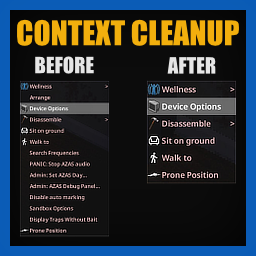
Project Zomboidの右クリックメニュー(コンテキストメニュー)の項目を整理するためのMODです。MODやゲーム本体によって追加された、頻繁に使用しない項目を非表示、削除、別のサブメニューへ移動、または名称変更することができます。これらの操作は、メニューに表示される項目名に基づいて設定されます。
このMODで何が変わるか
– ゲーム内オプションの「Mods」タブにある「Context Menu Cleanup」設定画面から、右クリックメニューのカスタマイズルールを設定できるようになります。
– メニュー項目を削除、非表示、移動、名称変更するルールを作成できます。
– ルールはセミコロンで区切られた文字列で設定され、メニューに表示される実際の項目名に基づいて機能します。ゲームやMODの内部的な定義を知る必要はありません。
– 他のMODが追加した項目を含む、全ての右クリックメニューに対して自動的に変更が適用されます。
– 項目の非表示・削除ルールでは、大文字・小文字を区別せず、`~`(チルダ)で始まる文字列を使用することで部分一致での指定が可能です(例: `~Teleport`)。
– 項目の移動ルールでは、「`移動したい項目>新しい親`」の形式で指定します。新しい親が存在しない場合、その名前で新しいサブメニューが作成され、項目がその下に移動します。
– 項目の名称変更ルールでは、「`古い名前>新しい名前`」の形式で指定します。古い名前を`~`で始めると、部分一致で名称を変更できます。
– 名称変更は、非表示や移動といった他のルールに影響を与えません(他のルールは元の項目名を使用します)。
– 「Debug logging」機能をオンにすると、メニューを開くたびに全てのメニュー項目名がコンソールに記録され、設定の補助として利用できます。
想定されるメリット(推定)
– 右クリックメニューが整理され、視認性が向上すると考えられます。
– 多数のMODを導入している環境で発生しやすい、メニュー項目の混雑を緩和できる可能性があります。
– 頻繁に使う項目を上位に配置したり、使わない項目を非表示にすることで、操作効率が向上すると考えられます。
– 誤操作の減少につながる可能性があります。
– プレイヤー個人の好みに合わせて、より快適なゲームUIを構築できると考えられます。
想定されるデメリット・注意点(推定)
– カスタマイズには、設定画面でのルール作成に時間と手間がかかる可能性があります。
– 誤ったルール設定により、必要なメニュー項目が意図せず削除されたり、アクセスしにくくなったりする可能性があります。
– MOD作者は、本MODのサポートは自由時間中に行われるため、即座のアップデートや応答は期待できないと明記しています。そのため、問題が発生した場合の対応が遅れる可能性があります。
– 非常に特殊なメニュー項目の動的な追加方法を持つMODとは、予期せぬ挙動が発生する可能性がゼロではありませんが、説明文からは広く対応していると読み取れます。
向いている人(推定)
– 多数のMODを導入しており、右クリックメニューが雑然としていると感じているプレイヤー。
– ゲームのUIを自分のプレイスタイルに合わせて徹底的にカスタマイズしたいプレイヤー。
– メニューの視認性や操作性を向上させ、ゲームプレイの効率化を図りたいプレイヤー。
– UIのカスタマイズ作業に時間を割くことを厭わないプレイヤー。
向いていない人(推定)
– MODの設定に時間をかけたくない、またはUIのカスタマイズに興味がないプレイヤー。
– 導入しているMODが少なく、右クリックメニューの混雑を特に感じていないプレイヤー。
– ゲームのデフォルトUIで十分満足しており、複雑な設定を避けたいプレイヤー。
総合評価(暫定)
– おすすめ度:★★★★☆
– 根拠:サブスクライバー数不明 + 右クリックメニューの整理・カスタマイズは、特に多数のMODを導入しているプレイヤーにとって、ゲームの操作性や快適性を大幅に向上させる非常に有用な機能です。設定に手間はかかるものの、その見返りは大きいと評価できます。
※この説明文はAIによる自動翻訳です。正確な情報は下記の原文またはSteam Workshop公式ページをご確認ください。
原文を見る(英語)
Right-click menus fill up with entries you never use, and every mod you add makes it worse. This one hides them, deletes them, moves them under another entry or renames them, all by name.
[hr][/hr]
How to Use
Everything is configured through the mod’s configuration screen, found in Options → Mods → Context Menu Cleanup. From there, you can create rules to remove, hide, move or rename context menu entries, as well as change how their names are displayed. Each option has its own field where you can enter one or more rules, separated by semicolons.
The rules are based on the names shown in the context menu, so you do not need to know anything about how a mod or the game internally defines its entries. Changes are applied automatically as menus are created, including entries added by other mods.
[hr][/hr]
Removing and Hiding Entries
List the entries you want removed or hidden, separated by semicolons:
Matching is based on the text you actually see in the menu and ignores capitalization. Start an entry with ~ to match anything containing it, so ~Teleport catches “Teleport Here”, “Teleport to Base”, and anything else containing that word, while a plain entry has to match the whole name.
You can also turn on Debug logging to log every menu entry name to the console as you open menus.
[hr][/hr]
Moving Entries
Write the pairs as Entry>New Parent and separate them with semicolons. Say your door options sit behind a “Check Status” entry and you would rather have them on the door itself:
It looks for both names through the whole menu, submenus included. The new parent keeps doing whatever it did before and gains a submenu holding the entry you moved. If the old parent ends up with nothing under it, that entry goes too, since a parent with an empty submenu does nothing on its own.
The new parent does not have to exist. Point several entries at the same name and they end up grouped under a new one, sitting where the first of them was:
[hr][/hr]
Renaming Entries
Write the pairs as Old Name>New Name and separate them with semicolons:
Some entries carry the name of whatever you clicked, like “Push Low Bench Trailer”. Start the old name with ~ and only that part changes, so one rule covers every piece of furniture:
You get “Shove Low Bench Trailer”, “Shove Wooden Chair” and so on. Your other lists keep using the names the game gave the entries, so a rename never stops a hide or move rule from working.
[hr][/hr]
There’s more!
If you like this mod, you should definitely check out my Spawn Point Cleanup mod to remove clutter from the spawn selection menu!
[hr][/hr]
This mod will be supported during my free time. Please don’t expect immediate updates or responses.
Workshop ID: 3780688809
Mod ID: ContextMenuCleanup
このMODはSteam Workshopで公開されています。ダウンロード・詳細は公式ページをご確認ください。