- 対応バージョン:1.2.1
- サブスクライバー数:60233
- 最終更新:2026-10-02 21:31:08 UTC
- 制作者:76561198304958134
MOD説明(日本語)
MOD概要
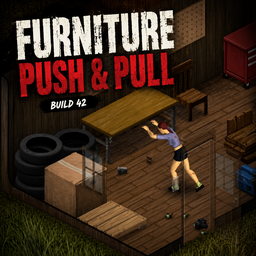
「Furniture Push & Pull」は、Project Zomboidにおいて、キャラクターの筋力を使って家具を1タイルずつ押したり引いたりして移動できるようにするMODです。家具を破壊したり、既存の設置メニューを利用したりすることなく、その場でレイアウトを変更できます。シングルタイルおよび大型テーブルやキャビネットなどのマルチタイル家具に対応し、中身の入ったコンテナもそのまま移動可能です。移動にはスタミナを消費し、キャラクターの筋力と家具の重さが移動速度とスタミナ消費に影響します。バニラに溶け込むような設計で、完全なコントローラーサポートとマルチプレイヤー互換性を備えています。Build 42.20+向けに開発されており、既存のセーブデータへの追加も安全です。
このMODで何が変わるか
プレイヤーは、サポートされている家具(シングルタイル・マルチタイル問わず)を、隣接した場所から右クリック(キーボード&マウス)またはコンテキストメニュー(コントローラー)で「Push(押す)」または「Pull(引く)」のアクションを選択し、1タイルずつ移動できるようになります。アイテムが満たされたコンテナ家具も、中身を空にすることなくそのまま移動可能で、中身は移動中も保持され、マルチプレイヤー環境でも同期されます。家具の移動にはスタミナが消費され、キャラクターの筋力レベルが高いほど移動が速くスタミナ消費が少なくなり、家具が重いほど移動に時間がかかりスタミナ消費が増えます。移動先のタイルに地面のアイテムがある場合は警告が表示されますが、移動自体は可能です(ただし、アイテムは地面に残るため視覚的に家具の上に乗って見える場合があります)。家具の移動は音を立てるため、近くのゾンビを引き寄せる可能性があります。開いたドアのフットプリントに家具が収まる場合、ドアを通過して移動できます。閉じたドアや壁は移動をブロックします。マルチプレイヤー環境では、家具の移動とコンテナの中身はサーバーによって権威的に処理され、プレイヤー間で同期されます。
想定されるメリット(推定)
– 拠点のレイアウト変更が格段に容易になると考えられます。家具を解体・再設置する手間や、解体による家具の破損、再設置に必要な資源(木材、釘など)を節約できる可能性があります。
– 探索やルート確保の自由度が高まると考えられます。邪魔な家具を一時的に移動させて進路を確保したり、隠されたアイテムを発見したりしやすくなるでしょう。
– よりリアルな避難所作りや、サバイバル生活における日々の行動に没入感が増すと考えられます。
– マルチプレイヤーで協力して拠点を構築する際、複数人で家具を移動させたり、レイアウトを共有したりしやすくなるため、協力プレイの促進につながる可能性があります。
– ゲームプレイの選択肢が増え、戦略の幅が広がると考えられます。例えば、特定の家具で一時的に通路をブロックするといった使い方も可能になるかもしれません。
想定されるデメリット・注意点(推定)
– 家具の移動にはスタミナを消費するため、特に筋力が低いキャラクターや、重い家具を連続して移動させる場合には、スタミナ切れによる疲労状態に陥る可能性があります。
– 家具の移動音はゾンビを引き寄せる可能性があるため、特にゾンビの多いエリアや隠密行動中に使用する際は、周囲の状況に十分注意する必要があるでしょう。
– 地面にあるアイテムの上に家具を移動させた場合、アイテムが家具の上に視覚的に表示されるという、レンダリング上の不整合が発生する可能性があります。機能には影響しませんが、見た目を気にするプレイヤーにとっては注意点となるかもしれません。
– Plant Drying Racksやシンク付きカウンターなど、一部の特殊な家具は、データ破損や破壊を防ぐために意図的に移動が制限されているため、全ての家具を自由に動かせるわけではないことに留意が必要です。
– バニラの家具配置システムに比べ、容易に家具を動かせるようになることで、ゲームの難易度や資源管理の側面が多少緩和されたと感じるプレイヤーもいる可能性があります。
向いている人(推定)
– 拠点のカスタマイズやレイアウト変更を頻繁に行いたいプレイヤーに非常に適していると考えられます。
– 探索やルート確保を重視し、家具が邪魔になる状況を解決したいプレイヤーに向いているでしょう。
– ロールプレイング要素や没入感を重視し、よりリアルな避難所作りを楽しみたいプレイヤーに適していると考えられます。
– マルチプレイヤーで協力して拠点作りや探索を楽しみたいプレイヤーにも、利便性が高まるためおすすめです。
向いていない人(推定)
– バニラの家具設置・解体システムに不満がなく、現状維持を望むプレイヤーには、必須ではないかもしれません。
– 広範囲の家具を極めて迅速に移動させたいプレイヤーは、1タイルずつ移動するため、解体・再設置の方が効率が良いと感じる場合もある可能性があります。
– ゲームの難易度を極力変更したくない、または非常に厳しいサバイバル環境設定でプレイしたいプレイヤーは、家具移動の簡素化がゲーム体験に影響を与えると感じる可能性があります。
総合評価(暫定)
– おすすめ度:★★★★★
– 根拠:Workshop登録者数は不明ですが、Project Zomboidにおいて家具の移動は多くのプレイヤーが不便に感じている点であり、このMODはその問題をバニラの雰囲気を損なわずに解決する優れた機能を提供します。既存のセーブデータに追加可能であること、マルチプレイヤーにも完全対応していること、そして移動にスタミナ消費や音といったバランス調整が施されていることから、ゲームプレイを大きく損ねることなく、利便性と自由度を大幅に向上させると考えられます。そのため、ほとんど全てのProject Zomboidプレイヤーにおすすめできる非常に有用なMODです。
※この説明文はAIによる自動翻訳です。正確な情報は下記の原文またはSteam Workshop公式ページをご確認ください。
原文を見る(英語)
Ever wanted to move a chair, table or cabinet without picking it up first?
Furniture Push & Pull lets you physically push and pull furniture one tile at a time using your character’s Strength.
Version 1.2.1
Fixed furniture disappearing after the Build 42.21 update
Updated the vanilla furniture-placement call for Build 42.21
Verified with both single-tile and multi-tile furniture
Version 1.2.0
Improved multi-tile furniture movement, including long desks and tables from every side
Fixed multi-tile furniture splitting apart while being moved
Furniture can now be moved through an open doorway when its complete footprint fits
Closed doors and walls continue to block furniture
Improved destination and player-space checks for Push and Pull
High ceiling lights no longer incorrectly block furniture below them
Counters with attached sinks and other unsafe fixtures remain protected from movement
Filled-container contents and visuals remain preserved in singleplayer and multiplayer
Updated and tested for Build 42.20.4 multiplayer
How to Use
Keyboard & Mouse
Stand directly next to a supported piece of furniture
Right-click the furniture
Select Push to move it one tile away from you
Select Pull to move it one tile toward you
Controller
Stand directly next to a supported piece of furniture
Open the standard world context menu
Select Push or Pull
When pulling furniture, your character automatically steps one tile backward before moving the furniture toward them.
The destination must have enough space for the entire piece of furniture.
Features
Push furniture one tile away from your character
Pull furniture one tile toward your character
Supports single-tile furniture
Supports multi-tile furniture such as large tables, desks and cabinets
Filled containers can be moved without removing their contents
Container contents are preserved during movement
Strength affects how quickly furniture can be moved
Furniture weight affects movement time and stamina usage
Moving furniture consumes stamina
Checks walls, doors, obstacles and the complete destination footprint
Warns when ground loot is present on the destination tile
Ground loot does not prevent furniture from being moved
Uses vanilla-style push and pull animations
Furniture movement creates sound and can attract nearby zombies
Full controller support
Multiplayer compatible and tested
Furniture movement and container contents are synchronized between players
Strength & Weight
Your Strength level affects how much effort it takes to move furniture.
Characters with higher Strength can move furniture faster and with less stamina cost, while weaker characters take longer and use more stamina.
Furniture weight is also taken into account. Multi-tile furniture is treated as heavier than smaller single-tile furniture.
Filled Containers
Furniture with items inside can be pushed and pulled without being emptied first.
The contents are preserved while the furniture is moved, including in multiplayer.
Some furniture uses decorative container overlays. These visuals are refreshed after movement, so the decorative arrangement may change while the actual contents remain unchanged.
Ground Loot
Furniture can still be moved onto tiles containing loose items on the ground.
If loot is detected on the destination tile, the mod displays a red warning before you move the furniture.
The items remain on the ground, but due to Project Zomboid’s rendering they may visually appear on top of the moved furniture.
Balanced & Vanilla-Friendly
Furniture Push & Pull is designed to feel like a natural part of Project Zomboid rather than a replacement for the existing furniture system.
Furniture is only moved one tile at a time, movement costs stamina, heavier objects take more effort, and blocked destinations cannot be used.
Controller Support
Full controller support.
Controller players can access Push and Pull through the standard world context menu while standing next to supported furniture.
Controller support works in both singleplayer and multiplayer.
Multiplayer
Fully multiplayer compatible and tested.
Furniture movement is handled authoritatively by the server and synchronized between connected players.
Filled container contents are preserved and synchronized when furniture is moved.
Multiple players can take turns pushing or pulling the same furniture.
Keyboard, mouse and controller players can all use the mod together.
Supported Furniture
The mod is intended for normal moveable floor furniture, including both single-tile and multi-tile objects.
Some objects such as rugs, wall decorations, windows and floor tiles are intentionally not supported.
Plant Drying Racks are temporarily excluded because Build 42.20 does not safely preserve active drying jobs when multi-tile furniture is moved.
Counters with sinks or other attached fixtures are also blocked when moving them could detach or destroy part of the furniture.
Existing Saves
Safe to add to an existing save.
The mod does not add new world generation or require a fresh world.
Build Compatibility
Made for Project Zomboid Build 42.20+.
Workshop ID
3781319724
Mod ID
FurniturePushPull
More Mods
Workshop ID: 3781319724
Mod ID: FurniturePushPull
このMODはSteam Workshopで公開されています。ダウンロード・詳細は公式ページをご確認ください。