- 対応バージョン:不明
- サブスクライバー数:4665
- 最終更新:2026-10-18 21:31:54 UTC
- 制作者:76561198047628737
MOD説明(日本語)
MOD概要
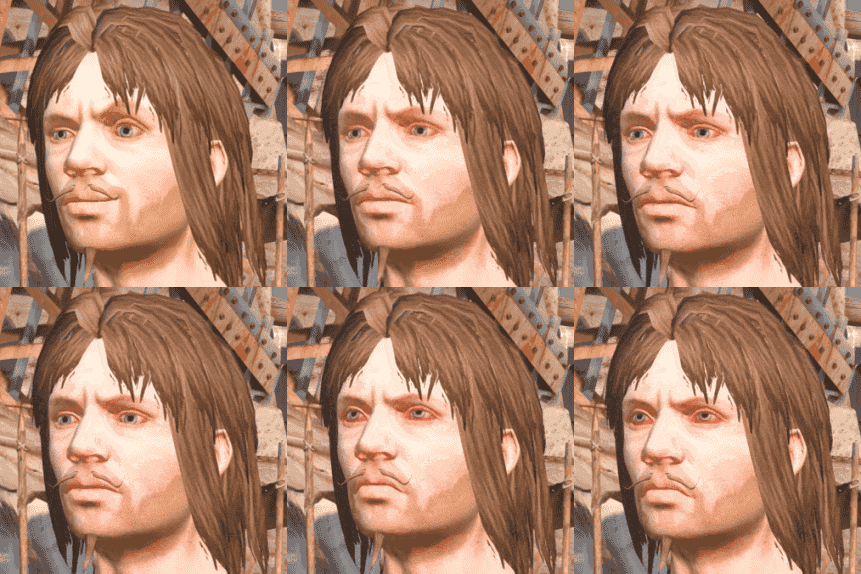
このMODは、必須MODである「Character’s Emotions」をKenshiのバニラ種族に対応させるための拡張MODです。具体的には、グリーンランダー、スコッチランダー、シェク、ハイブ(ハイブクイーンを含む)のプレイヤー操作キャラクターに「Character’s Emotions」による表情表現を追加します。スケルトンはゲーム内の設定に基づき、表情を作らないため、現在のところサポートされていません。
このMODで何が変わるか
– プレイヤーが操作するグリーンランダー、スコッチランダー、シェク、ハイブ(ハイブクイーン含む)のバニラ種族キャラクターに「Character’s Emotions」MODの表情表現機能が適用されます。
– 表情の切り替わりは、完全には自然に見えない場合があります。
– このMODの機能は、プレイヤー操作キャラクターにのみ適用され、他のNPCには適用されません。
– 本MODを利用するには「Character’s Emotions」MODが必須です。
想定されるメリット(推定)
– プレイヤー操作キャラクターが感情豊かな表情を見せるようになるため、ロールプレイの没入感が向上すると考えられます。
– キャラクターへの愛着が深まる可能性があります。
– バニラ種族でプレイする際に、より生き生きとしたキャラクター表現を楽しめるようになると考えられます。
想定されるデメリット・注意点(推定)
– 表情の切り替わりが不自然に見える可能性があることが明記されています。
– プレイヤー操作キャラクターにのみ表情が適用されるため、他のNPCとの間に視覚的な差異が生じる可能性があります。
– バニラ種族のキャラクターモデル(「female mesh」や「male mesh」)を変更する他のMOD(例: JRPG Vanilla、More Character Making Slidersなど)とは高い確率で競合する可能性があります。これらのMODとの併用は推奨されていません。
– 競合するMODと同時に使用した場合、見た目が崩れたり、MODが正しく動作しなかったりする可能性があります。
– 互換性のあるMODは「XMLファイルのみでキャラクターカスタマイズを変更するMOD」や「新しいアニメーションを追加するMOD」に限定される可能性があります。
– 多数のNPCに表情を適用した場合、パフォーマンスに大きな影響が出るとされていますが、本MODはプレイヤー操作キャラクターに限定されているため、その点での大きなデメリットは直接的には生じないと考えられます。
向いている人(推定)
– プレイヤーキャラクターの感情表現を重視し、ロールプレイや没入感を高めたい人。
– バニラ種族でKenshiをプレイすることが多く、そのキャラクターに表情を付けたい人。
– 他の外観変更MOD(特にバニラ種族のメッシュを直接変更するもの)をあまり使用しない、または併用するMODの互換性を自分で確認できる(FCSを使用するなど)人。
– プレイヤー操作キャラクターのパフォーマンスを優先し、NPCへの表情適用は不要と考える人。
向いていない人(推定)
– 全てのNPCに表情表現を求める人(このMODではプレイヤー操作キャラクターのみが対象のため)。
– 「JRPG Vanilla」などのバニラ種族の外観を大きく変更するMODを優先して使用したい人。
– MODの競合や導入の複雑さを避けたい人、またはFCSによる互換性確認作業が面倒だと感じる人。
– 表情の不自然な移行がプレイ体験を損なうと感じる可能性がある人。
総合評価(暫定)
– おすすめ度:★★★☆☆
– 根拠:必須MODである「Character’s Emotions」の機能をバニラ種族に拡張するという点で、特定のプレイヤーには非常に有用なMODです。これにより、プレイヤーキャラクターの没入感と表現力が向上します。しかし、バニラ種族のメッシュを改変する他の多くの外観変更MODとの高い競合率があり、MOD構成に注意が必要である点が評価を分ける可能性があります。サブスクライバー数は不明ですが、機能のユニークさと、競合への対処が必要な点を総合的に考慮しました。
※この説明文はAIによる自動翻訳です。正確な情報は下記の原文またはSteam Workshop公式ページをご確認ください。
原文を見る(英語)
Due to requests for races other than VRoid, I have made Kenshi’s vanilla races compatible with Character’s Emotions.
Greenlanders, Scorchlanders, Shek, and Hivers (including the Hive Queen) are supported.
Based on dialogue that can be found in Kenshi, Skeletons are described as not making facial expressions, so support for Skeleton facial expressions is currently on hold.
Since this was made in a hurry, the facial expression transitions may not look completely natural.
‘Character’s Emotions’ only works on player-controlled characters.
Applying it to other NPCs as well would cause a significant performance impact.
(If the mod tried to give facial expressions to all those Fogmen in the Fog Islands, your pc will be burning!)
Required Mod
Character’s Emotions
Installation and Usage
After subscribing to the mod, launch the game and enable both ‘VanillaRace4CharactersEmotions’ and ‘CharactersEmotions’.
The load order between these two mods does not matter. However, make sure that no other mod overwrites ‘VanillaRace4CharactersEmotions’.
Important Notes
This mod is very likely to conflict with other mods that modify the vanilla races. (For example: JRPG Vanilla)
If you want to use this mod, it is recommended that you do not use other appearance overhaul mods.
Simple hairstyle addition mods should be fine to use.
Q & A
Q: Why can’t I use other mods with this mod?
A: As an analogy, when we speak, we normally use one language at a time.
For example, you would say “Apple” in English or “Sa-Gwa” in Korean.
English also has the word “Pineapple,” while Korean does not have a directly corresponding native word. Instead, it is commonly called “Pa-In-Ae-Pul,” which is a transliteration of “Pineapple.”
Character models work in a similar way.
You need to use either a model that supports Character’s Emotions or a model from another mod. You cannot use both models at the same time.
Also, each model supports a different set of character customization sliders.
With languages, if your language does not have a certain word, you can simply borrow a word from another language. Unfortunately, character models do not support this kind of behavior.
The only way to make everything work together would be similar to someone creating a new language by combining the vocabulary of every language:
all of the sliders from every mod would have to be collected and merged into a single model.
However, doing this is extremely difficult.
Q: What kinds of mods are compatible?
A: Any mod that does not modify ‘female mesh’ or ‘male mesh’ should be compatible.
Mods that only contain XML files and affect character customization should not conflict.
Mods that modify the skeleton to add animations should also be compatible.
(In this case, files such as female_skeleton.mesh and male_skeleton.mesh may be included as part of the skeleton setup, but these are not the race meshes, so they do not affect compatibility.)
Q: Can you give some examples?
A: Yes. Here are some examples.
Mods that only contain XML files and simply modify character sliders:
e.g. ‘Beautiful Bodies and Faces’, ‘Increase Body Slider Limits’
Mods that only add new animations:
e.g. ‘More Combat Stance MIA+’, ‘Animation Overhaul Mod – Crafting’
Mods that are incompatible because they modify ‘female mesh’ or ‘male mesh’:
e.g. ‘More Character Making Sliders’, ‘JRPG Vanilla’
Q: Is there a way to check whether another mod is compatible?
A: Yes, although the process is a little complicated. You can check it using FCS.
First, you need to move the downloaded Workshop mod into the Mods folder inside your Kenshi installation directory.
There are several folders with numeric names in this directory. Check each folder and look at the name of the .mod file inside to find the mod you want.
Then rename that folder so that its name matches the .mod file.
For example, the folder ‘3791607178’ contains the file ‘VanillaRace4CharactersEmotions.mod’, so rename the folder from ‘3791607178’ to ‘VanillaRace4CharactersEmotions’.
Then move the renamed folder to:
After that, run ‘forgotten construction set.exe’ and open the mod.
Once the mod is loaded, select ‘Changes’ from the menu at the top.
Look through the Change List and check whether the mod modifies ‘female mesh’ or ‘male mesh’.
If neither of them appears in the Change List, the mod should be compatible.
If either ‘female mesh’ or ‘male mesh’ has been modified, the two mods will conflict.
このMODはSteam Workshopで公開されています。ダウンロード・詳細は公式ページをご確認ください。