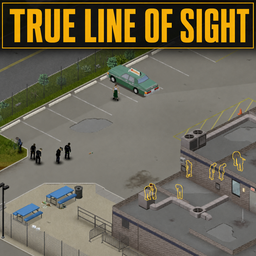
- 対応バージョン:不明
- サブスクライバー数:86317
- 最終更新:2026-10-23 21:30:20 UTC
- 制作者:76561198064107312
MOD説明(日本語)
MOD概要
プレイヤーからは見えないが、キャラクターからは見えている障害物(建物、屋外の屋根付きエリア、階段、車両)によって隠されているゾンビをハイライト表示するMODです。キャラクターの実際の視界を変更したり、壁越しにゾンビを見せる機能はありません。既存のセーブデータへの追加、更新、削除は安全に行えます。マルチプレイヤーに対応しており、Project Zomboid Build 42をサポートしています。
このMODで何が変わるか
* レンダリングされた障害物(建物、屋外の屋根付きエリア、階段、車両)の裏に隠れてプレイヤー視点から見えないゾンビに、設定可能なアウトラインが表示されるようになります。
* ハイライトはゾンビの動き、構造物のフェードアウト、視点変更に応じて動的に変化します。
* 屋外の屋根付き構造物(ひさし、パティオ、ガソリンスタンドの屋根など)の下に隠れたゾンビもハイライト対象となります(オプションで有効/無効化可能)。
* 階段の終端付近に隠れたゾンビもハイライト対象となります。上階のゾンビモデルがレンダリングされない場合、地上にプレースホルダーのアウトラインが表示されます(オプションで有効/無効化可能)。
* 車両の裏に隠れたゾンビもハイライト対象となります。標準的なProject Zomboidの車両および互換性のある寸法のMod車両がサポートされます。
* プレイヤーのエイム操作なしで自動的にゾンビをスキャンしハイライト表示する機能があります(デフォルト有効)。この機能は数百体のゾンビがいるようなエリアではパフォーマンスに影響を与える可能性があります。
* バニラの建物が切り取られ透明になる際に、建物によるハイライトを解除する機能があります(デフォルト有効)。
* ハイライトの解除条件(プレイヤーからの距離、暗さ、視界コーンの範囲、エイム解除後の持続時間)や色を細かく設定できます。
* ゾンビのアウトライン、視覚システム、または主要なレンダラーを置き換えるMODと視覚的または機能的に競合する可能性があります。
* 極端に密度の高いゾンビや大規模な都市構造ではフレームレートの低下が発生する可能性がありますが、自動スキャン機能を無効化しエイムモードを使用することでパフォーマンスを改善できます。
想定されるメリット(推定)
* 視覚的な死角が減少し、レンダリングによって隠されたゾンビからの不意打ちを受けるリスクが大幅に低下すると考えられます。
* 特に大規模な建物内部、階段周辺、車両の裏側、屋外の屋根付きエリアといった見落としやすい場所に潜む危険を早期に察知できるようになり、探索の安全性が向上すると考えられます。
* 豊富な設定オプションにより、プレイヤーの好みに合わせてハイライトの表示方法や解除条件を調整できるため、より快適なプレイ環境を構築できると考えられます。
* 既存のセーブデータに安全に追加・削除できるため、導入の敷居が低く、気軽に試すことができると考えられます。
* マルチプレイヤー環境において、チームメイトが気づいていない脅威を視覚的に把握しやすくなるため、連携や情報共有に役立つ可能性があります。
想定されるデメリット・注意点(推定)
* ゲームのリアリズムや没入感が一部損なわれる可能性があります。隠れた敵に対する緊張感や発見の喜びが減少するかもしれません。
* 極端にゾンビが密集した地域や大規模な都市部では、PCのスペックによってはフレームレートが低下する可能性があります。その場合、自動スキャン機能を無効にするなどの設定変更が必要になるでしょう。
* ゾンビのアウトライン、視覚システム、または主要なレンダラーを置き換える他のMODと競合し、視覚的な不具合や機能的な問題が発生する可能性があります。
* このMODはキャラクターの実際の視界を広げるものではないため、キャラクターが視認できていないゾンビはハイライトされない点に注意が必要です。
* 隠れたゾンビの発見が容易になることで、ゲームの難易度がわずかに低下する可能性があります。
向いている人(推定)
* 視覚的な死角によるゾンビからの不意打ちで死亡するリスクを減らしたいプレイヤー。
* 探索時の安全性を高め、ストレスなくゲームを楽しみたいプレイヤー。
* 特に建物内部や構造物の多い場所での探索を重視するプレイヤー。
* Project Zomboid初心者で、視覚的な補助によってゲームに慣れたいプレイヤー。
* マルチプレイヤーで、より円滑な連携と情報共有を求めるプレイヤー。
* ゲームの難易度を少し緩和し、より快適なサバイバルを目指したいプレイヤー。
向いていない人(推定)
* ゲームのリアリズムや没入感を最重視し、視覚的な補助を極力避けたいプレイヤー。
* 不意打ちによる緊張感やスリル、予想外の状況をゲームの醍醐味として楽しみたいプレイヤー。
* MODによるゲームの難易度変化を避け、バニラに近い体験を好むプレイヤー。
* PCのスペックが低く、パフォーマンスのわずかな低下も避けたいプレイヤー(ただし、設定で軽減は可能)。
* MODの互換性問題に遭遇したくない、複雑なMOD構成を避けたいプレイヤー。
総合評価(暫定)
* おすすめ度:★★★★☆
* 根拠:サブスクライバー数については説明文に記載がないため不明。機能ベースでは、Project Zomboidにおける「死角からの不意打ち」という主要な脅威を大幅に軽減する非常に有用な機能を提供します。既存セーブへの安全な導入・削除、マルチプレイヤー対応、豊富な設定オプションなど、利便性も高いです。一部パフォーマンスへの懸念やリアリズムを損なう可能性はありますが、多くのプレイヤーにとってゲーム体験を向上させる価値あるMODであると考えられます。
※この説明文はAIによる自動翻訳です。正確な情報は下記の原文またはSteam Workshop公式ページをご確認ください。
原文を見る(英語)
What the mod does
True Line of Sight checks visible zombies and determines whether the game’s isometric rendering is concealing them from the player. Relevant zombies receive a configurable outline, while indoor zombies, unseen zombies and zombies unrelated to an obstruction remain unaffected. Highlighting responds dynamically as zombies move, structures fade away or the viewing angle changes.
How it works
Buildings
The mod estimates the screen area covered by nearby buildings using their shape, height and position relative to the isometric camera. Zombies hidden behind the rendered structure can be outlined until they move clear or Project Zomboid’s normal building cutaway exposes them.
Awnings, patios and petrol station roofs
Covered outdoor structures are detected separately from enclosed buildings. This includes eligible awnings, porches, patios, canopies and petrol station roofs. The mod estimates each roof’s projected obstruction area and removes its highlights when the roof fades away. This feature can be enabled or disabled independently in the mod options.
Stairs
The mod can highlight visible zombies concealed around staircase endpoints. When Project Zomboid does not render an upper-floor zombie’s model near a staircase, a grounded placeholder outline is displayed instead so the danger is still communicated clearly. Staircase highlighting can be enabled or disabled in the mod options.
Vehicles
Vehicle highlighting uses each vehicle’s position, dimensions, orientation and approximate height to determine whether its rendered body is covering a zombie. Smaller vehicles use tighter detection areas, while taller vehicles can obscure a larger portion of a standing zombie. Standard Project Zomboid vehicles and modded vehicles that provide compatible dimensions are supported.
Mod options
Automatic field-of-view scanning
Automatically checks visible zombies without requiring the aim control. It uses the character’s current field of view and ignores the fixed highlight-cone settings. Default: enabled.
Automatic scanning is more demanding than aim mode, particularly in areas containing hundreds of zombies.
Respect vanilla building cutaway
Removes and suppresses highlights for a building while Project Zomboid’s normal proximity cutaway is exposing it. Default: enabled.
Vehicle obstruction highlighting
Enables or disables highlighting for zombies obscured by vehicles without affecting building highlighting. Default: enabled.
Highlight fade (proximity)
Immediately removes building-based highlights when zombies reach this distance from the player. This does not apply to vehicle highlights.
Measured in tiles. Set it to 0 to disable proximity fading. Default: 4 tiles.
Highlight fade (vision cone)
Sets the total width of the fixed highlight cone used in aim mode. It does not change the character’s real field of view.
Measured in degrees. Set it to 360 to disable this restriction. Default: 45 degrees.
Use player’s field of view
Uses Project Zomboid’s current character field of view for aim-mode highlights instead of the fixed highlight-cone value.
Automatic scanning already uses this behaviour. Default: disabled.
Highlight fade (darkness)
Sets the minimum amount of light required for a zombie to be highlighted. Higher values require brighter conditions.
Set it to 0 to disable darkness fading. Default: 10%.
Highlight linger duration
Controls how long otherwise-valid highlights remain after releasing the aim control.
Proximity, darkness, vision-cone, vanilla-cutaway and vehicle-obstruction conditions can still remove a highlight immediately.
Measured in seconds. Default: 3 seconds.
Highlight colour
Changes the colour of the zombie outline.
Planned Improvements
Possible future improvements include:
Highlighting zombies below north or west-facing upper-floor windows.
Supporting player highlighting under the same conditions as zombies.
These features will only be added if they can work reliably without excessive false highlights or performance costs.
Frequently asked questions
Is it the same as Cone Vision Outline?
I seem to get asked this a lot. Cone Vision Outline is a great mod. It outlines all character-visible zombies in a cone in front of you. It will outline every single zombie that’s hidden from you by the game’s isometric camera angle. But it also highlights all zombies that aren’t hidden by the isometric camera angle. True Line of Sight only highlights zombies that are hidden by obstructing building/vehicle/structure renders.
Is it safe to add to an existing save?
Yes.
Is it safe to update mid-save?
Yes.
Is it safe to remove mid-save?
Yes.
Do I need to start a new game?
No.
Does it work in multiplayer?
Yes.
Is it compatible with other mods?
It should be compatible with most mods.
Vehicles using standard Project Zomboid dimensions are supported. Unusually shaped custom vehicles may be approximated less accurately. Mods that replace zombie outlines, visibility systems or major parts of the renderer may conflict visually or functionally.
Does it reveal zombies my character cannot see?
Only zombies visible to your character can be highlighted.
Will it affect performance?
Extremely dense populations and large urban structures may cause some frame-rate loss.
Players who need better performance can disable automatic scanning and use aim mode instead.
Which game version is supported?
Project Zomboid Build 42
Workshop ID: 3792740760
Mod ID: TrueLineOfSight
このMODはSteam Workshopで公開されています。ダウンロード・詳細は公式ページをご確認ください。