- 対応バージョン:不明
- サブスクライバー数:16321
- 最終更新:2026-10-26 21:30:56 UTC
- 制作者:76561197960417099
MOD説明(日本語)
MOD概要
指定したエリア内でProject Zomboidの繰り返し可能なバニラタスクを自動的に実行するためのMODです。キャラクターは選択された長方形のエリア内で、パスファインディング、アニメーション、ツール選択、耐久性、疲労、インベントリ容量などのバニラのアクションを通じて作業を調整し、実行します。
本MODは既存のセーブデータへの追加・削除が可能です(ただし、重要なセーブのバックアップが推奨されています)。シングルプレイヤーおよびマルチプレイヤーの両方でBuild 42.21向けにテスト済みです。CN(簡体字中国語)、DE(ドイツ語)、ES(スペイン語)、IT(イタリア語)、RU(ロシア語)、UA(ウクライナ語)の翻訳が含まれています。
このMODで何が変わるか
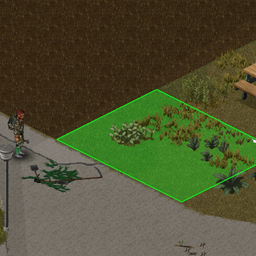
ゲーム内ワールドを右クリックすることで「Area Tasks」サブメニューが追加され、そこから様々なエリア指定型タスクを実行できるようになります。タスクを選択後、緑色の選択範囲をドラッグして作業エリアを指定するか、特定の対象を選択することで、そのエリア内の対象に対して自動的に一連の作業がキューに入れられます。
以下の広範なバニラタスクを、指定エリアに対して自動的に実行します:
– **園芸**: 草刈り、草除去、畝立て、茂み除去、壁のツタ除去、切り株除去、各種石/木材の除去。
– **耕作地**: 種まき、肥料/堆肥追加、病害虫対策、収穫、水やり、除去。
– **拠点確保**: 窓閉め、カーテンの追加/閉鎖/除去/回収、板/金属板/金属棒によるバリケード設置/除去(内側/外側/両方)。
– **シャベル作業**: 土/粘土/砂/砂利の採取、糞の回収。
– **回収**: 割れたガラス、ゴミの回収。
– **動物**: 乳搾り、毛刈り、撫でる、餌付け、解体。
– **伐採**: 木の伐採。
– **解体**: 家具の解体。
– **清掃**: 灰の除去、汚れの清掃、落書きの除去。
– **死体処理**: 地面/コンテナ/車両への移動、ゴミ箱に捨てて自動で空にする(SPおよび許可されたMPサーバーのみ)、窓から投げ捨てる。
– **アイテム移動**: 地面/コンテナ/車両/所持バッグ間でアイテムを移動(単体またはエリア指定)。
タスク実行時には、ツール選択、耐久性消費、疲労、インベントリ容量など、バニラのメカニズムが適用されます。道具が不足している場合や、到達不能な場所がある場合、キャラクターが疲労している場合などは、作業が停止またはスキップされます。
サンドボックス設定により、以下のような挙動をカスタマイズできます(シングルプレイヤーではゲーム内オプション、マルチプレイヤーではサーバー設定):
– 板バリケードの挙動(各面に4枚フルで張るか、1枚ずつ追加するか)。
– タスク実行中の時間加速の挙動(シングルプレイヤーのみ)。
– 右クリックメニューでの表示位置。
– エリア選択の最大幅・高さ(デフォルト25タイル、1〜50タイルで設定可能)。
– 目的地までの最大距離(デフォルト50タイル、1〜100タイルで設定可能)。
– 解体タスクの最大家具数(デフォルト10個、0〜100個で設定可能、0でタスク無効化)。
– アイテム移動時の運搬制限(最大積載量か、過負荷を避けるか)。
想定されるメリット(推定)
– **時間と労力の削減**: 広い畑の収穫、広範囲の草刈り、多くの窓のバリケード化、散乱したアイテムの回収といった複数の繰り返し作業を一度の指示で自動化できるため、プレイヤーの手動操作による移動やクリックの手間が大幅に削減され、ゲームプレイの効率が向上すると考えられます。
– **ルーティン作業の簡素化**: 拠点建設、農園管理、地域清掃といったルーティン作業が、より少ないクリックで完了するため、ゲームプレイがスムーズになり、より戦略的な活動や探索に時間を割けるようになると考えられます。
– **大規模な拠点の管理**: 非常に広い拠点を築いたり、大量の物資を整理したりする際に、手動では膨大な時間と手間がかかる作業を効率的にこなせるようになり、大規模プレイがより快適になると考えられます。
– **リアルなキャラクターの挙動**: キャラクターが疲労したり、ツールが壊れたり、インベントリが満杯になったりすると作業を中断する挙動は、ゲームのリアルさを損なわずに利便性を向上させていると考えられます。
– **建築・解体作業の効率化**: 家具の解体やバリケード設置、窓のカーテン追加などがエリア指定で可能になるため、拠点の改装や防衛体制の構築が迅速に行えると考えられます。
想定されるデメリット・注意点(推定)
– **誤操作による意図しない結果**: 広範囲にわたる自動作業であるため、誤って不要なエリアを選択したり、間違ったタスクを指示したりすると、意図しない場所にアイテムが移動されたり、重要な構造物が解体されたりする可能性があります。
– **リソース消費の加速**: ツールやスタミナ、水などのリソースはバニラ通り消費されるため、大量の作業を自動化した結果、予期せずツールの耐久度が底をついたり、水や肥料が不足したりする可能性があります。特に、斧やシャベルなどの耐久度が急速に低下する可能性があります。
– **パフォーマンスへの影響**: 非常に広いエリアや多数のオブジェクトに対してタスクを実行した場合、ゲームのパフォーマンスが一時的に低下する可能性があります。特に、マルチプレイヤーサーバーでは、サーバー負荷が増加する可能性も考えられます。
– **キャラクターの危険**: 死体処理や広範囲の作業中にゾンビに遭遇した場合、キャラクターはタスクを優先してしまい、安全を確保するための迅速な行動が遅れる可能性があります。自動化された作業中は周囲の警戒が手薄になる可能性があり、プレイヤーは常にキャラクターの状況を監視する必要があります。
– **ゲームバランスの変更**: 一部のプレイヤーにとっては、手動での地道な作業こそがProject Zomboidの魅力であると感じる場合があります。このMODはそうした側面を大幅に緩和するため、ゲームの難易度や「サバイバル感」が低下したと感じる可能性があります。
向いている人(推定)
– **大規模な拠点や農場を運営したいプレイヤー**: 広いエリアでの整地、耕作、収穫、アイテム整理などを効率的に行いたい人。
– **繰り返し作業に煩わしさを感じるプレイヤー**: 草刈り、ゴミ拾い、窓のバリケード化など、手動で何度もクリックするのが面倒だと感じる人。
– **拠点建築や改装を頻繁に行うプレイヤー**: 家具の解体やバリケードの設置・撤去をスピーディに行いたい人。
– **時間効率を重視するプレイヤー**: サバイバル以外の要素(探索、戦闘、クラフトなど)により多くの時間を費やしたいと考える人。
– **マルチプレイヤーで共同作業の効率化を図りたいプレイヤー**: サーバー設定が許せば、大規模な共同拠点運営の際に効率的な作業分担が可能になると考えられます。
向いていない人(推定)
– **バニラのゲームプレイ体験を重視するプレイヤー**: MODによる大きな機能追加を避け、手動での地道な作業を含むバニラのサバイバル体験を楽しみたい人。
– **ゲームバランスの緩和を好まないプレイヤー**: 作業の自動化がゲームの難易度を低下させ、達成感を損なうと感じる人。
– **細かな手動操作や管理を楽しむプレイヤー**: ひとつひとつの作業を自分の手で行い、その過程を楽しむ人。
– **PCスペックに余裕のないプレイヤー**: 広範囲のタスク処理によるパフォーマンス低下を懸念する人。
総合評価(暫定)
– おすすめ度:★★★★★
– 根拠:Project Zomboidのゲームプレイにおいて、時間がかかる反復作業を大幅に効率化できる非常に強力な機能を提供しています。特に大規模な拠点運営や建築において、その恩恵は計り知れません。多くのバニラタスクに対応し、サンドボックス設定による豊富なカスタマイズ性も持ち合わせています。バニラのメカニズム(ツール消費、疲労など)を尊重しつつ、利便性を高めているため、ゲームバランスを極端に崩すものではありません。シングル・マルチ両対応であり、既存セーブへの追加・削除も比較的安全であると明記されています。多言語対応も行われており、幅広いユーザー層にアクセス可能です。本MODの機能が、ゲームプレイのストレスを軽減し、より創造的で戦略的な活動に集中できる環境を提供すると考えられるため、ほとんどのプレイヤーにとって非常に有用であると判断できます。
※この説明文はAIによる自動翻訳です。正確な情報は下記の原文またはSteam Workshop公式ページをご確認ください。
原文を見る(英語)
Area Tasks performs work through vanilla actions: pathfinding, animations, tool selection and wear, endurance, strain, inventory capacity, etc. It coordinates actions over a selected rectangle area.
Build 42.21 tested for both single-player and multiplayer.
Safe to add to or remove from an existing save, but backing up an important save before changing any mod list is still recommended.
For bug reports, please open a discussion thread and describe what was selected, what the character did, and where the task stopped. Include a screenshot and console.txt errors if possible when they may help. Please see the stickied discussion thread about Vanilla Task Bugs as well.
Translations included: CN, DE, ES, IT, RU, UA. (See section below for more info).
How it works
Right-click the world and open the Area Tasks submenu.
Choose a task, then select its source or drag out the green selection rectangle.
For Move Items, select the source, then the destination. Single selects one container or vehicle storage area; Area uses a rectangle to select multiple containers or vehicle storage areas. For bag, choose a carried bag.
For Move Corpses, select the source area, then choose what you want to do with them. You can move them to a specific ground location, container, or vehicle storage area. In single player and MP servers that allow it, you can throw them in a dumpster and empty it automatically. Or, you can throw them through an open unbarricaded window.
The character visits eligible targets and queues their native game actions. Genuine blockers such as exhaustion, missing tools, unreachable targets, or interrupted actions stop or skip work instead of being hidden.
Included tasks
Gardening > Scythe Grass
Gardening > Remove Grass
Gardening > Dig Furrow
Gardening > Remove Bush
Gardening > Remove Wall Vine
Gardening > Remove Stump
Gardening > Remove > All Stones / Stone / Large Stone / Flat Stone / Limestone / All Wood / Twigs / Tree Branch / Log
Plowed Land > Sow > carried seed type
Plowed Land > Add Fertilizer
Plowed Land > Add Compost
Plowed Land > Treat Problem > Mildew / Pest Flies / Slugs and Snails / Aphids
Plowed Land > Harvest
Plowed Land > Water
Plowed Land > Remove
Secure > Close Windows
Secure > Curtains > Add Sheets / Close Curtains / Remove Curtains / Pickup Curtains
Secure > Barricade Planks / Barricade Metal Sheet / Barricade Metal Bars / Remove Barricades > Inside / Outside / Both
Shovel > Take some > Dirt / Clay / Sand / Gravel
Shovel > Pick Up Dung
Pick Up > Broken Glass
Pick Up > Trash
Animals > Milk
Animals > Shear
Animals > Pet
Animals > Add Bait > carried bait type
Animals > Butcher
Cut down Tree
Disassemble (furniture)
Clear Ashes
Clean Stains
Remove Graffiti
Move Corpses > To Ground / To Container / To Vehicle / To Trash and Empty / Throw Corpse Through Window
Move Items > Ground / Vehicle (Single) / Vehicles (Area) / Container (Single) / Containers (Area) > Ground / Container (Single) / Containers (Area) / Vehicle (Single) / Vehicles (Area) / Bag
Tool are found in the character’s carried inventory, including bags. Scythe Grass usess a full scythe over the hand version if available. Cut down Tree tries to use the best axe with highesst damage and replaces broken axes during the job.
Move Items makes multiple trips; Bag destinations put items straight into your chosen bag. Unwanted items are left behind; container and vehicle sources also leave favorites. Container areas include every stacked container on covered tiles. Draw vehicle areas over the highlighted storage zones; open their doors first. Area deliveries fill suitable storage and spill over to other selected targets. Undelivered items stay carried if storage fills or delivery fails. Excess may be dropped beside the container.
Disassemble selects eligible furniture, nearest first, up to the sandbox limit (10 by default). You need the tools vanilla requires for each object. Containers must be empty, and furniture with another piece of furniture on top is left alone. Clear the lamp or television first, then select the area again for the furniture underneath. Loose items placed on a surface follow vanilla behavior. Multi-tile furniture counts once and must fit entirely inside the selection.
Sandbox options
In single-player worlds, including Apocalypse, find these settings under Options > Mods > Area Tasks. Saved preferences apply across your single-player worlds. No additional mod is needed. Multiplayer uses the server’s sandbox settings; local controls are not shown there.
Plank Behavior – Fully Plank Windows (default) fills each selected side to four planks. One Plank Per Window adds a single plank per selected side per run.
Time speed during area tasks (single-player) – Maintain speed between actions and return to normal when the job ends by default. Alternatively follow normal speed change rules, or maintain speed during and after the job. Manual speed changes, pause, and other game-triggered speed changes still apply. No effect in multiplayer.
Context Menu Position – Below Vanilla Tasks by default; may instead place Area Tasks at the top or bottom. The default Below Vanilla Tasks puts it above Sit on ground and Walk to.
Maximum Area Width and Height – 25 tiles by default; configurable from 1 to 50.
Maximum Destination Distance – 50 tiles by default; configurable from 1 to 100.
Maximum furniture per Disassemble task – 10 by default; configurable from 0 to 100. Set to 0 to hide and disable Disassemble.
Move Items carry limit – Maximum Carry by default. Avoid Overburden uses the character’s current unburdened capacity, including existing carried weight, and may require more trips. Applies to every route except Bag destinations. Items too heavy for the available allowance are left behind.
Translations
I include and maintain requested translations, especially those provided by the community. I use machine translation to fill gaps and welcome corrections from native speakers. Please find the discussion thread for each language to request updates.
Spanish (ES) translation by ShArK_Web3; some new strings machine-translated.
Ukrainian (UA) translation by Kaus; some new strings machine-translated.
Simplified Chinese (CN) menu translation by Folivora; other strings machine-translated.
Italian (IT) translation by Nycotex.
Russian (RU) translation by Slimer91; some new strings machine-translated.
German (DE) translation by Shadowmio; some new strings machine-translated.
For modders
Want to add your mod’s actions to Area Tasks? The included 42/API.md guide explains registration, tools, selection rules, events, and queue handling. You can make a separate compatibility mod that requires both mods. Simply using the API does not require permission from me.
Moats Area Task, made with Tchernobill’s blessing, is our working example: https://steamcommunity.com/sharedfiles/filedetails/?id=3798215287
Permissions
Mod ID
Workshop ID: 3793163745
Mod ID: AreaTasks
このMODはSteam Workshopで公開されています。ダウンロード・詳細は公式ページをご確認ください。