- 対応バージョン:不明
- サブスクライバー数:117512
- 最終更新:2026-10-17 21:31:03 UTC
- 制作者:76561199214960935
MOD説明(日本語)
MOD概要
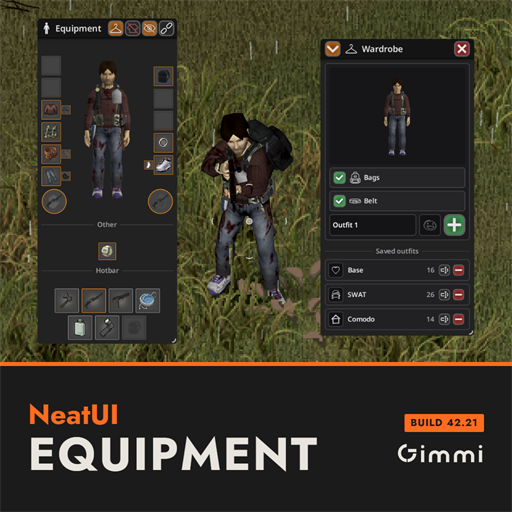
プレイヤーキャラクターの装備状況を3Dモデルで視覚的に表示し、服装の管理を効率化するUI拡張MODです。インベントリの横に配置される専用ボタンからアクセスし、キャラクターが着用している服やアイテムを3Dで確認できます。NeatUIスタイルに統一されており、Build 42.20以降のゲームバージョンが必須となります。
このMODで何が変わるか
– **装備の視覚化:** 従来の装備UIに加え、キャラクターの3Dモデルが常に表示され、着用している全ての装備や手に持っているアイテムがリアルタイムで反映されます。キャラクターは着替える際に回転します。
– **アウトフィット機能(Wardrobe):**
– 服装の組み合わせをプリセットとして保存し、いつでも一括で着替えられるようになります。
– 保存前に3Dモデルでプレビューでき、名前と任意のアイコンを設定可能です。
– 保存されたアウトフィットは、その防御力と保温性が部位ごとに表示されます。
– 装備は現在着用中のもの、インベントリ内、またはアクセス可能なコンテナ内から自動的に探されます。
– 色やパターンも記憶され、正確な内容で着替えが行われます(含まれないものは脱ぎ、含まれるものは着用)。
– バッグとベルト(ホットバー付き)は、アウトフィットごとに着替えの対象に含めるか選択できます。
– 服装が足りない場合はどの部位が不足しているか通知され、残りの部分は自動で着用されます。
– 着替える際に脱いだ服は、自動的に適切なコンテナ(理想的にはその服が元あった場所)に戻されます(設定でオフ可能)。服が床に落ちたり、マネキンや火の中に置かれることはありません。
– Wardrobeパネルは、Neat Rocco’s UIと同様にタイトルバーに折り畳むことが可能です。
– 保存されたアウトフィットは、ロード後や元の服が破壊された後も機能します。
– **UI操作の拡張:**
– 装備パネル上部に4つのボタンが追加され、「パネルの固定解除/再固定」「装備中のアイテムをインベントリリストから非表示」「全装備の一括脱衣/再着用」「Wardrobeの開閉」を操作できます。
– アイテムはドラッグ&ドロップで装備、解除、左右の持ち替え、ホットバーへのクリップが可能です。
– スロットを右クリックすると、通常のアイテムメニューが表示されます。
– パネルは固定解除後、ドラッグで移動、角のグリップでサイズ変更が可能です。
– 専用のホットキー割り当て、およびコントローラー操作に対応しています。
– **対応言語:** ゲームに搭載されている全ての26言語に翻訳されています。
– **互換性:**
– CleanUI向けに作られており、CleanUIのインベントリに溶け込むように表示・機能します。CleanUIのシャツボタンは本MODの「目」ボタンに置き換えられます。
– Inventory Tetrisが導入されている場合、Tetrisの装備ウィンドウを本MODのパネルが置き換えます。ドラッグ&ドロップは両方で機能します。
– クライアントサイドコードのみであるため、サーバーのチェックサム問題は発生しません。
– 他のNeatMODと連携するように設計されています。
想定されるメリット(推定)
– **装備管理の視覚性と効率性の向上:** 自分のキャラクターが実際に何を着ているか3Dモデルで直感的に確認できるため、特に重ね着の状況が非常に分かりやすくなり、装備管理が格段に楽になると考えられます。
– **クイックチェンジによる利便性:** Wardrobe機能により、戦闘用、探索用、拠点作業用など、特定の状況に応じた服装セットを素早く切り替えることができ、時間と手間を大幅に節約できると予想されます。
– **アイテム整理の簡素化:** 脱いだ服が自動的に適切なコンテナに戻される機能は、インベントリや拠点内のアイテム整理を効率的に行えると期待できます。
– **ロールプレイの深化:** 気分や状況に応じて手軽に服装を切り替えられることで、ロールプレイの幅が広がると考えられます。
– **UIの統一感:** NeatUI FrameworkとCleanUIを使用しているプレイヤーにとっては、UI全体に統一感が生まれ、操作性が向上すると考えられます。
想定されるデメリット・注意点(推定)
– **必須MODとバージョン:** `NeatUI Framework`の導入が必須であり、Project ZomboidのバージョンがBuild 42.20以降である必要があります。これらの要件を満たさない場合、MODは機能しない可能性があります。
– **UIの変更:** 既存のUIに大きく手を加えるため、他のUI変更MODや装備関連の表示を変更するMODとの競合が発生する可能性があります。
– **学習コスト:** 新しいUIとWardrobe機能、および各種ボタン操作に慣れるまで、ある程度の時間が必要になる可能性があります。
– **リソース消費:** 3Dモデルのリアルタイム表示は、わずかながらシステムのグラフィックリソースを消費する可能性があります。低スペックPCではパフォーマンスに影響が出る可能性も否定できません。
向いている人(推定)
– **キャラクターの外見やロールプレイを重視するプレイヤー:** 自分のキャラクターが装備しているものを3Dで確認し、様々な服装を楽しみたい人に特に向いていると考えられます。
– **装備管理を効率化したいプレイヤー:** 状況に応じた装備の着替えを頻繁に行う人や、アイテム整理の手間を減らしたい人に非常に適しているでしょう。
– **NeatUI/CleanUIシリーズのユーザー:** 既にNeatUI FrameworkやCleanUIを使用しており、UIの統一感を求めるプレイヤーに最適です。
– **最新のゲームバージョン(Build 42以降)でプレイしているプレイヤー:** バージョン要件を満たしているため、スムーズに導入・利用できます。
向いていない人(推定)
– **バニラのUIにこだわりがあるプレイヤー:** UIの大幅な変更を好まず、バニラのUIに慣れている人には向いていない可能性があります。
– **必須MODの導入を避けたいプレイヤー:** `NeatUI Framework`が必須となるため、導入するMODの数を最小限に抑えたい人には不向きかもしれません。
– **古いゲームバージョン(Build 42.20未満)でプレイしているプレイヤー:** バージョン要件を満たさないため、このMODは導入できません。
– **非常に低スペックなPCを使用しているプレイヤー:** 3D表示によるわずかなリソース消費でもパフォーマンスへの影響を懸念する場合には、導入を再検討する必要がある可能性があります。
総合評価(暫定)
– おすすめ度:★★★★★
– 根拠:キャラクターの装備を3Dで視覚化し、Wardrobe機能で服装の管理を大幅に効率化する機能は、Project Zomboidのゲームプレイの快適性を劇的に向上させます。特に、アイテム整理の自動化や、迅速な装備切り替えは、中盤以降の複雑なプレイにおいて非常に強力な助けとなります。CleanUIなどの既存UI MODとの互換性も高く、UI系MODとしての完成度と実用性が極めて高いと評価できます。必須MODやバージョン要件はありますが、それを補って余りあるメリットが期待できるため、導入を強く推奨します。(サブスクライバー数はWorkshop説明文に記載がないため不明)
※この説明文はAIによる自動翻訳です。正確な情報は下記の原文またはSteam Workshop公式ページをご確認ください。
原文を見る(英語)
Your character in 3D, surrounded by everything they are wearing. One click on the figure button beside your inventory. Built for Build 42 and styled to match NeatUI down to the last rounded corner. 🧡
👔 The Wardrobe
Save an outfit once, put it back on whenever you like — even when the clothes are not on you any more.
🧍 See it before you save it: your character in 3D wearing exactly what will be saved, with a name and a symbol of your choice
📂 Click a saved outfit to open it: the outfit in 3D on your own character, and the shirt button to put it on
🛡️ Beside it, protection and temperature show that outfit’s own defence and warmth, part by part, and replace saves what you have on over it, name and symbol kept
🔎 It finds every piece: already on you, in your inventory, or in any container within reach
🎨 Colour and pattern are remembered, so a blue shirt comes back blue
🎯 An outfit is exact — what it contains goes on, what it does not comes off
🎒 Your bags are never taken off. Two ticks decide, outfit by outfit, whether bags and the belt with its hotbar are part of it
👟 Changes from the feet up, one part of the body at a time, taking things out and putting them away one container at a time
💬 Missing a piece? It tells you which one and puts the rest on anyway
🔄 Container swap, on by default: each piece you take off goes back where things of its kind already are — ideally the container its replacement came from — and stays in your inventory when there is no such place. A note over your head says where things went, and nothing ever ends up on the floor, on a mannequin or in a fire
🔽 The arrow in its header rolls the Wardrobe up to a title bar, the Neat Rocco’s UI way
💾 Stored as descriptions, not links — outfits survive a reload and the original garment being destroyed
✨ The panel
🧍 Your character in 3D, centred, turning as you dress and undress
🟧 Slots down both sides, the same rounded squares as your hotbar
👐 Both hands as round slots in the bottom corners
🧦 Layered clothing shows as small chips beside the slot — click to fold them out
⌨️ The hotbar below the doll, so you can see what is clipped where
🌍 Translated into all 26 languages the game ships with
🎛️ Four buttons in the title bar
🔗 Chain — unhook the panel, move and resize it freely, click again to snap it back
👁️ Eye — hide the equipped section in the inventory list
👕 Shirt — strip everything in one press; press again and it all goes back on
🪝 Hanger — open the Wardrobe
🖱️ Controls
Click the figure beside your inventory to open and close the panel — on the left of the inventory, or on the right if you prefer it there (Options → Mods)
Drag and drop to equip, unequip, swap hands or clip to the hotbar
Right-click any slot for the usual item menu
Drag the title bar to move the panel once unhooked, the corner grip to resize it
Assignable hotkey under [NeatUI Equipment] in Options → Key Bindings
🎮 Controller supported — pick the button in Options → Mods
📦 Requirements
🔗 NeatUI Framework — subscribe to it too. Without it the mod cannot be ticked in the mod list.
🧟 Build 42.20 or later. On an older build the mod list shows it greyed out with no incompatibility to explain why: update the game.
🏷️ Outfit symbols
The game’s map symbols, plus two packs included with thanks:
ExtraMapSymbols by Wipe, Lexx and B (Rotators)
Add More Map Symbols by Golem
💾 Compatibility
✅ Made for CleanUI. The figure button lives on the edge of the CleanUI inventory, the panel hangs off it and follows it around, and the slots are Clean HotBar slots — one interface, not two mods sitting side by side. CleanUI’s own shirt button steps aside: hiding equipped items is the eye’s job here.
📐 It matches your inventory. Hooked on, the panel stretches down to meet the bottom of your inventory window, so resizing CleanUI resizes it too.
🎨 Or looks exactly like it. Tick Look like CleanUI in Options → Mods and the panel and the wardrobe take CleanUI’s own frame and background opacity. Otherwise set the background opacity yourself with a slider.
🎒 Inventory Tetris is supported. With Tetris on, this panel takes the place of the equipment window Tetris brings with it — one panel on the edge of your inventory instead of two fighting over the same spot — and drag and drop works across both: a garment dropped on the grid lands in the square you dropped it on.
🖥️ Client-side code only, so there are no server checksum issues.
🤝 Designed to work alongside the other Neat mods.
Workshop ID: 3790656296
Mod ID: NeatUI_Equipment
このMODはSteam Workshopで公開されています。ダウンロード・詳細は公式ページをご確認ください。