- 対応バージョン:不明
- サブスクライバー数:4225
- 最終更新:不明
- 制作者:76561198014968620
MOD説明(日本語)
MOD概要
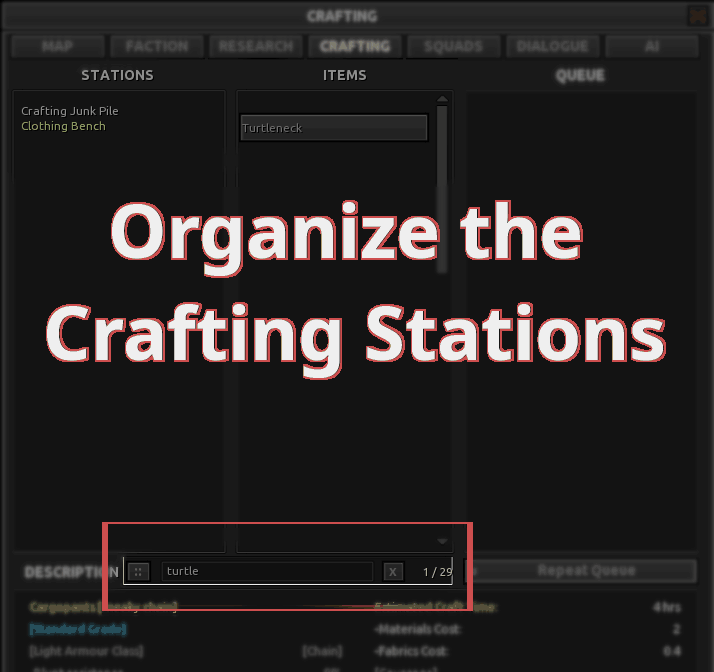
Kenshiのクラフトウィンドウと研究ウィンドウに検索バーを追加するMODです。この検索バーを使用することで、レシピや設計図のリストをフィルタリングし、目的の項目を素早く見つけることができるようになります。
このMODで何が変わるか
– ゲーム内の**CRAFTING**タブと**RESEARCH**タブに検索バーが追加されます。
– 検索ボックスにレシピや設計図の名前の一部を入力すると、一致する項目のみが表示され、上部に移動します。一致しない項目は非表示になります。
– 検索バーの「X」ボタンをクリックすると、現在の検索クエリがクリアされます。
– 検索バーの「::」ハンドルをドラッグすることで、表示位置をカスタム設定できます。
– 動作にはRE_Kenshiが必須です。
– Emkejs Mod Coreが導入されている場合、Mod HubにこのMODの設定が登録され、mod-config.jsonに変更が保存されます。
想定されるメリット(推定)
– 膨大な数のレシピや設計図の中から、目的のアイテムを効率的に見つけ出すことができると考えられます。
– スクロールする手間が大幅に削減され、クラフトや研究のUI操作が快適になる可能性があります。
– 特に、多数のアイテムを追加するMODを導入している環境において、その利便性が際立つと考えられます。
– カスタム配置機能により、プレイヤーの好みに合わせてUIを調整できる可能性があります。
想定されるデメリット・注意点(推定)
– 必須MODであるRE_Kenshiの導入が必要なため、追加の手間が発生する可能性があります。
– クラフトや研究のタブを調整する他のMODやプラグインと競合する可能性があります。UI要素の変更を伴うMODとの相性を確認する必要があるでしょう。
– 検索バーはCRAFTINGおよびRESEARCHタブにのみ表示され、MAP、FACTION、SQUADS、DIALOGUE、AIなどの他のタブには表示されない点に注意が必要です。
– カスタム配置した検索バーが予期せぬ位置に表示された場合、mod-config.jsonを手動で編集する必要が生じる可能性があります。
向いている人(推定)
– 多数のクラフトレシピや研究項目が追加されるMODを導入しているプレイヤー。
– KenshiのUI操作、特にクラフトや研究時の効率を重視するプレイヤー。
– RE_Kenshiの導入に抵抗がなく、他のRE_Kenshi対応MODも利用しているプレイヤー。
– 頻繁にクラフトや研究を行い、その過程をスムーズにしたいと考えているプレイヤー。
向いていない人(推定)
– クラフトや研究をほとんど行わない、あるいは既存のバニラコンテンツで十分だと感じるプレイヤー。
– MOD導入の手間を極力避けたい、特に必須MODの導入に抵抗があるプレイヤー。
– UIの変更を好まず、シンプルなインターフェースを維持したいプレイヤー。
– RE_Kenshiや他のUI変更MODとの競合を避けたいプレイヤー。
総合評価(暫定)
– おすすめ度:★★★★☆
– 根拠:サブスクライバー数については情報がないため不明。機能ベースでは、Kenshiのクラフト・研究UIの利便性を大幅に向上させる強力なMODです。特にMODを多数導入し、レシピや研究項目が増大している環境では、ゲームプレイの快適性に大きく寄与すると考えられます。必須MODがある点と、UI競合の可能性を考慮し、最高評価からは一歩引いたものの、多くのプレイヤーにとって非常に有用なMODであると判断できます。
※この説明文はAIによる自動翻訳です。正確な情報は下記の原文またはSteam Workshop公式ページをご確認ください。
原文を見る(英語)
Requirements
RE_Kenshi
How to Use
Open the CRAFTING or RESEARCH tab in-game.
Click the search box and type part of a recipe or blueprint name.
Matching rows stay visible and move upward; non-matching rows are hidden.
Use the X button to clear the current query.
Drag the :: handle if you want to move the search bar to a custom position.
Compatibility
No special load order required beyond RE_Kenshi unless you also use Emkejs Mod Core. For Mod Hub integration, load Emkejs Mod Core before this mod.
May conflict with mods/plugins that also adjust the crafting/research tabs.
Optional Mod Hub
If Emkejs-Mod-Core is installed, this mod also registers its core settings in Mod Hub and still persists changes back to `mod-config.json`.
Recommended load order:
Emkejs-Mod-Core
this mod
Troubleshooting
If the search bar does not appear, make sure you are on the CRAFTING or RESEARCH tab. It is not meant to appear on MAP, FACTION, SQUADS, DIALOGUE, or AI.
If the mod does not load at all, verify that RE_Kenshi is installed correctly and that the mod is enabled in the Kenshi launcher.
If Mod Hub settings do not appear, install Emkejs Mod Core and load it before this mod.
If another mod also changes the crafting or research tabs, test again with that mod disabled to rule out UI conflicts.
If a saved custom search-bar position ends up in a bad spot, reset the related position values in mod-config.json or set searchInputPositionCustomized back to false.
Version: 0.1.0-alpha.2
My other mods
Wall-B-Gone – Adds a hotkey that allows the player to quickly dismantle player-built walls
Job-B-Gone – Adds a collapsible in-game panel above the squad UI that lets you quickly remove queued jobs for one member, selected members, a whole squad, or all player squads
Auto-Pause on Load – Auto-Pause on Load automatically pauses Kenshi after a save finishes loading, giving you time to review your squad and situation before the game resumes
Loot-Scoot-Execute – Adds an Execute action for downed enemies in the right-click context flow
Vital Sense – Highlights downed characters with state text/icons and shows configurable bounty symbol markers for downed and live bounty targets while ALT is held.
Organize the Trader – Adds a search bar to Kenshi trader windows so you can find items faster.
Map markers -Adds persistent custom markers to Kenshi’s world map through RE_Kenshi. You can place markers per save, assign a type, add a short label, and manage them directly on the map.
Emkejs Mod Core – Install this to enable the in-game menu and shared settings for this mod.
Vital Read – Adds small configurable status markers to squad portraits so you can read critical downed and injury states at a glance without opening each character panel.
Hidden Faction Relations – Adds an in-game panel to the Options menu that shows the player’s hidden faction relations.
Emkejs Test Kit – Adds an in-game debug toolkit for Kenshi that brings Health, Stats, Teleport, Inventory, and Spawn tools together in a single panel, with spawn faction testing.
Organize the Inventory – Adds search bars to Kenshi’s inventory UI so you can filter the active player inventory view or supported creature and pack-animal inventory views without moving items.
Support / full patch notes
For updates, full changelog, bug reports, and support, use the Nexus page:
Organize the Crafting Stations on Nexus Mods
Support the developer
If you enjoy my mods and want to support future development, you can support me on Ko-fi. You can also help decide what I build next by voting in my polls:
https://ko-fi.com/emkej
このMODはSteam Workshopで公開されています。ダウンロード・詳細は公式ページをご確認ください。