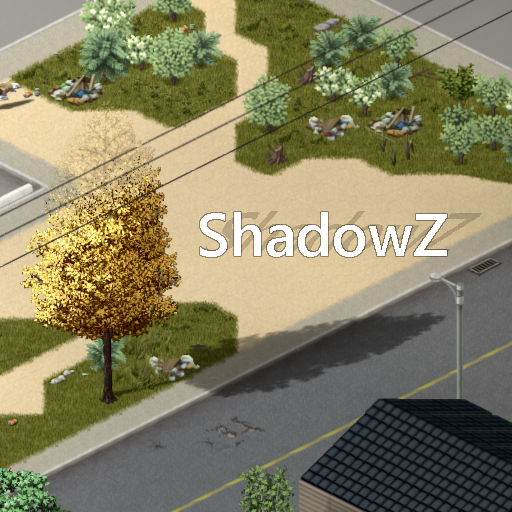
- 対応バージョン:不明
- サブスクライバー数:15439
- 最終更新:2026-11-03 21:30:25 UTC
- 制作者:76561198040780708
MOD説明(日本語)
MOD概要
Project Zomboid 42.20.4 向けに、動的な太陽光、影、および様々な雰囲気効果をノックスカントリーに追加するMODです。
本Workshopアイテムには、Javaパッチを手動で適用する「Standaloneエディション」と、MODローダーであるZombieBuddyを通じてロードする「ZombieBuddyエディション」の両方が含まれており、ユーザーはいずれか一方を選択してインストールします。
どちらのエディションも提供されるShadowZの機能は同じであり、両方を同時にロードすることはできません。
このMODで何が変わるか
* **動的な太陽光と影:** 太陽の方向がゲーム内の時刻(夜明け、夕暮れ)と季節に応じて変化し、影もそれに合わせて回転し、長さが変わるようになります。
* **詳細な影の表現:**
* 木、植生、フェンス、家具、複数のタイルで構成される構造物などが、それぞれのスプライトシルエットに基づいて影を落とします。
* プレイヤー、ゾンビ、乗り物が3Dモデルから詳細な影を落とすようになります(ただし、詳細なメッシュシャドウが生成できない場合やレンダリングの予算外の場合は、既存のネイティブシャドウが維持されます)。
* **雰囲気効果の追加:**
* 太陽の影の方向に沿って、明るい太陽ディスクや画面の隅に現れる黄色のハローなしで、微妙な平行な光線が描画されます(夜間、屋内、夜間視力ゴーグルがアクティブな間は無効になります)。
* ゲーム世界の背景(空の部分)が、現在レンダリングされているシーンの平均色に合わせて滑らかに変化するようになります。この機能は無効にでき、特定の代替色を選択することも可能です。
* 時折、遠くの野生動物を示唆する鳥のシルエットが飛行する視覚効果が追加されます(これは純粋な視覚効果であり、実際の動物のスポーン、音、AIの追加はありません)。
* **カスタマイズ可能な設定:** 「Options > Mods > ShadowZ」から、影のカテゴリや雰囲気効果の有効/無効、影の数や描画距離を細かく調整できます。
* **多言語対応:** 英語、フランス語、簡体字中国語、繁体字中国語に対応しています。
* **バニラ機能の維持:** 既存の視線システム、ゾンビモデルのカリング、視認性の挙動、510モデル制限、視認性ポリゴンは変更されません。また、バニラの夜間視力特性や夜間視力ゴーグルも通常通り機能します。
* **KI5車両との互換性:** KI5のすべての車両MODと互換性があります。
想定されるメリット(推定)
* **グラフィックの向上:** 日光の動き、詳細な影、そして様々な雰囲気効果により、ゲーム全体の視覚的なリアリティと没入感が大幅に向上すると考えられます。特に、時間帯や季節の移り変わりがより視覚的に表現されるでしょう。
* **雰囲気の強化:** 微妙な太陽光線や鳥のシルエット、周囲の色に合わせた背景の変化などにより、Project Zomboidの終末的な雰囲気が一層強化される可能性があります。
* **高いカスタマイズ性:** 影のカテゴリや雰囲気効果の有効/無効、描画数や距離などを細かく調整できるため、プレイヤーのPC性能や好みに合わせて最適な設定を見つけやすいと考えられます。
* **既存MODとの良好な互換性:** バニラの視線システムやゾンビのカリングなどに影響を与えない設計のため、他のゲームプレイ関連のMODとの競合は少ないと推測されます。
想定されるデメリット・注意点(推定)
* **パフォーマンスへの影響:** 詳細なメッシュシャドウの描画はレンダリング負荷が高く、特に密林地帯、ゾンビの大群、分割画面でのプレイ、遠距離ズーム時にはCPUおよびGPUのコストが増加する可能性があります。PCのスペックによってはフレームレートの低下を招く恐れがあります。
* **互換性問題の可能性:** `screen.frag`ファイルを置き換えたり、既存の影、キャラクター/乗り物のレンダリングメソッドにパッチを当てる他のMODとは競合する可能性があります。
* **インストールおよび管理の手間:** Standalone版を選択した場合、ゲームディレクトリへの.jarファイルの手動コピーとJavaのclasspath編集が必要となるため、PCのファイル操作や設定変更に不慣れなユーザーにとっては敷居が高い可能性があります。また、MODやゲーム本体のアップデート時には、手動での.jarファイルの再コピーやclasspathの確認が必要になることがあります。
* **リアルタイムレイトレーシングではない:** 太陽光線は雰囲気的なスクリーンエフェクトであり、すべての建物や木によって遮られる体積光をシミュレートするものではありません。また、重なり合う影のグローバルな統合はこのリリースでは有効になっていません。
* **動作環境の限定:** Project Zomboid Build 41はサポートされておらず、Project Zomboid 42.20.4をターゲットとしているため、それ以外の古いビルドでは動作しない可能性があります。
向いている人(推定)
* **グラフィックの向上を求めるプレイヤー:** Project Zomboidの視覚的なクオリティを最大限に高め、よりリアルで没入感のある世界を体験したいプレイヤー。
* **PCのスペックに余裕があるプレイヤー:** パフォーマンスの低下を許容できる、または高スペックなPCを所有しており、高いグラフィック設定でゲームを楽しみたいプレイヤー。
* **ゲームの雰囲気を重視するプレイヤー:** 日光の移ろいや影、鳥のシルエットといった細部の変化から、ゲームの世界観や雰囲気をより深く感じたいプレイヤー。
* **MODの導入・設定に慣れているプレイヤー:** Standalone版のインストールや、MOD設定の調整を厭わないプレイヤー。
向いていない人(推定)
* **低スペックPCのプレイヤー:** グラフィック設定によるパフォーマンス低下を避けたい、フレームレートの安定性を最優先するプレイヤー。
* **シンプルなゲームプレイを好むプレイヤー:** グラフィックよりもゲームプレイの軽快さや安定性を重視し、余計な負荷を避けたいプレイヤー。
* **複雑なMOD導入・管理を避けたいプレイヤー:** 手動でのファイル操作や設定変更に抵抗がある、またはMOD管理の手間を最小限にしたいプレイヤー。
* **既に多くのグラフィック変更MODを導入しているプレイヤー:** 他のグラフィックMODとの競合や、複合的なパフォーマンスへの影響を避けたいプレイヤー。
総合評価(暫定)
– おすすめ度:★★★★☆
– 根拠:Project Zomboidの視覚体験を大幅に向上させる豊富なグラフィック機能を提供し、高いカスタマイズ性も持ち合わせています。対応するゲームバージョンも比較的新しく、今後の標準的なグラフィック強化MODとなる可能性を秘めていると考えられます。ただし、パフォーマンスへの影響や、Standalone版のインストール・管理の手間が考慮されるため、満点には至りませんでした。サブスクライバー数は不明ですが、機能面から見て非常に魅力的なMODです。
※この説明文はAIによる自動翻訳です。正確な情報は下記の原文またはSteam Workshop公式ページをご確認ください。
原文を見る(英語)
Standalone and ZombieBuddy editions • Project Zomboid 42.20.4
Moving sunlight, projected shadows and subtle atmospheric effects for Knox Country.
Both editions are included in this Workshop item. ZombieBuddy is optional.
I provide both versions so you can choose how ShadowZ runs on your computer. If you prefer to install the Java patch manually without ZombieBuddy, use the Standalone edition. If you prefer loading it through ZombieBuddy, that edition is included too. Both provide the same ShadowZ features.
Choose one installation method. Do not load both ShadowZ runtimes together.
[hr][/hr]
Features
ShadowZ integrates with Project Zomboid’s world and model rendering. Solar direction follows the time of day, dawn, dusk and the seasons.
Moving solar shadows — shadows rotate and change length throughout the day.
World and tree shadows — supported trees, vegetation, fences, furniture and multi-tile structures cast shadows derived from their sprite silhouettes.
Detailed character and vehicle shadows — players, zombies and vehicles can cast shadows from their rendered 3D models. The native shadow remains when the current mesh shadow cannot be composed or the actor is outside the detailed-shadow budget.
Sun-aligned rays — subtle parallel rays follow the projected direction of the solar shadows, without a bright sun disc or yellow corner halo. Their visibility and intensity are adjustable.
Adaptive background — the world void follows the rendered scene’s average colour with a smooth transition. You can disable adaptation and choose a fallback colour; its default is #6A6968.
Bird silhouettes — occasional silhouettes in flight suggest distant wildlife. These are visual effects and do not spawn animals, sounds or AI.
Separate controls — enable or disable shadow categories and atmospheric effects, and adjust shadow counts and distances from Options > Mods > ShadowZ.
Translations — English, French, Simplified Chinese and Traditional Chinese (thanks to laoda and GG Bon for the CN and CH translation).
ShadowZ preserves vanilla line of sight, zombie model culling and visibility behaviour. It does not remove the 510-model cap or the visibility polygon. Vanilla night-vision traits and goggles retain their normal rendering path; the added sun rays are disabled at night, indoors and while night-vision goggles are active.
Option 1 — Standalone, without ZombieBuddy
This method does not require ZombieBuddy or another Java mod loader. You install ShadowZ.jar manually and keep the ShadowZ companion mod enabled for its shaders, textures and settings.
[olist]
Subscribe to this Workshop item, then fully close Project Zomboid.
Open steamapps/workshop/content/108600/3800671550/mods/ShadowZ in the Steam library containing the game.
Inside the Build 42 folder (42 or 42.0, depending on the package), open manual-install/ProjectZomboid. Copy ShadowZ.jar beside the game’s projectzomboid.jar.
Back up the launcher file for your chosen launch method, then add the classpath entry below.
Enable ShadowZ in the mod manager. Do not enable ZombieBuddy with this manual installation of ShadowZ, because it can load the second runtime too.
Fully restart the game.
[/olist]
Normal Steam launch — ProjectZomboid64.json
Insert “ShadowZ.jar” before “projectzomboid.jar” in the classpath list. Preserve any other entries already present. A standard list becomes:
Alternate Launch — ProjectZomboid64.bat
Add ShadowZ.jar before projectzomboid.jar in PZ_CLASSPATH, preserving any other entries. A standard line becomes:
Use Steam’s Alternate Launch option when using the BAT method.
The companion mod supplies the shaders. No manual shader replacement is required for the current package.
Option 2 — With ZombieBuddy
Use this method if you choose to load ShadowZ through ZombieBuddy.
[olist]
Install ZombieBuddy using its official installation instructions.
Subscribe to this Workshop item and enable ZombieBuddy and ShadowZ.
Approve ShadowZ’s Java module if the loader requests it.
Fully restart Project Zomboid after installation or an update.
[/olist]
ShadowZ needs no manual classpath entry with this method. If switching from Standalone, close the game and remove its ShadowZ.jar classpath entry before enabling the ZombieBuddy edition.
Settings and debug traces
Open Options > Mods > ShadowZ to configure the mod.
Debug tracing is off by default, including when Project Zomboid is launched with -debug. It runs only after an explicit opt-in. A previously saved enabled setting remains enabled; turn it off in ShadowZ’s options after troubleshooting.
Updates and removal
All installations: fully close and restart the game after updating the Java runtime.
Standalone updates: copy the updated Workshop ShadowZ.jar into the game directory again. Steam does not update this manually copied file.
After a game update: check that your chosen launcher still includes the Standalone classpath entry. Renderer changes may require a compatible ShadowZ update.
Remove Standalone: remove its classpath entry and the copied ShadowZ.jar, then disable the ShadowZ mod.
Remove the ZombieBuddy edition: disable ShadowZ and fully restart the game.
Performance and compatibility
Detailed mesh shadows add rendering work. Dense forests, large crowds, split-screen and distant zoom levels can increase CPU and GPU cost. Reduce tree count/radius and detailed character-shadow distance if needed. Disabling a mesh-shadow category retains its native fallback.
Target: Project Zomboid 42.20.4. Build 41 is not supported.
Mods replacing screen.frag or patching the same shadow and character/vehicle render methods may need compatibility work.
Sun rays are an atmospheric screen effect; they do not simulate volumetric light blocked by every building or tree.
Overlapping shadows can still darken one another. A global shadow merge is not enabled in this release.
Compatible with all actual KI5 vehicles
Reporting an issue
Please include a screenshot or short video and the relevant console.txt lines. State which installation method you use so reports can be reproduced with the same loader.
[hr][/hr]
Workshop ID: 3800671550
Mod ID: ShadowZ
このMODはSteam Workshopで公開されています。ダウンロード・詳細は公式ページをご確認ください。